Itunes 7: More features; some frustrations
The first thing I have to say about Itunes 7 is that the interface is gorgeous. Just simply beautiful. There are new features, but the application's already good interface is better. There are still some typical dumb Apple moves, but you can work around them.
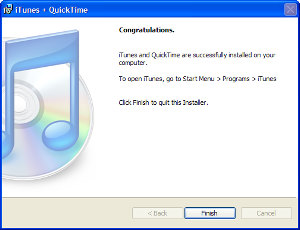
When you install Itunes, the installer will install QuickTime. I've always felt that QT is the weakest media player on a Windows machine, but I've grown to accept it. What I don't accept or appreciate is Apple's insistence on starting the Tray-based Itunes "helper" application when Windows starts. Yes, I can turn it off, but I shouldn't have to. Either it should be off by default or the installer should offer a choice when the user is installing the application.
This version has an automatic updater. Everybody wants to give me an automatic updater, but I usually don't want them. These things all require some memory and they check in with the mother ship on a schedule of their choosing. I'd like to make that choice. The updater is on by default, but you can turn it off during the installation.
That's the bad stuff.
Itunes and the Itunes Store now supports, as I reported earlier, video. TV shows and movies. Fewer than 100 movies are available now from Walt Disney Pictures, Pixar, Touchstone Pictures, and Miramax Films. Users can watch the videos on their computers and Ipods (the ones with video). Video for Apple's upcoming Itv player will be coming. Itv is the internal development name; the product will have some other name when it's released.
Apple CEO Steve Jobs says “In less than one year we’ve grown from offering just five TV shows to offering over 220 TV shows, and we hope to do the same with movies. iTunes is selling over one million videos a week, and we hope to match this with movies in less than a year.”
I'm not a big fan of television and generally don't watch it even though a set it about 5 feet from where I'm writing this. It's just too much distraction and too much time for too little intellectual value. Given that, I doubt that I'll be watching much television via Itunes. Movies might be different, though.
But my primary use for Itunes is playing music I can work to. And for that function -- it's core value -- it hasn't been beaten by anything.
 |
|
The application is a quick download (if you have a high speed connection) and a relatively fast install. Windows users will have to restart their computers.
Click any of the images for a larger view. |
| |
|
|
 |
|
And there's the little QuickTime helper. Why can't software companies get it through their thick skulls that users don't always want help from the application – particularly if the application doesn't ask first. |
| |
|
|
 |
|
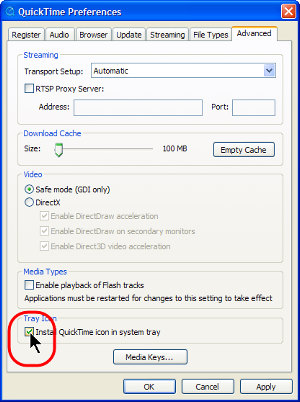
Turning off the little annoyance is easy enough and it doesn't whine the way Real Media's Real Player does. To stop QuickTime from loading automatically to the Tray, just deselect the item shown.
Why should you turn this off? In the words of The Ultimate Troubleshooter from Answers That Work: "Apple's QuickTime Tray Icon enables you to start QuickTime from the System Tray. Given the extremely simple functionality of this Tray icon, it is in our view an unreasonable resource hog - it has been measured to use as much as 1.5Mb of memory at times in earlier versions, and in version 7 it
uses as much as 3.4Mb of memory on our test systems. Yet, on Windows PCs hardly anyone starts QuickTime manually, whether from the System Tray or otherwise - what usually happens is that the end-user opens a QuickTime movie file or email attachment and Windows then automatically opens QuickTime to
enable the end-user to view the movie or video. There is therefore almost never a need for the end-user to start QuickTime manually from the System Tray." |
| |
|
|
 |
|
Now it's gone and I can get on with life. |
| |
|
|
 |
|
Make sure click this image to see the new interface. The changes are subtle, but evident. The clock at the top and the little Random House symbols are not part of Itunes.
If you look closely, you'll see that Itunes is currently examining my music for gapless playback. See "Mind the gap" below. |
| |
|
|
 |
|
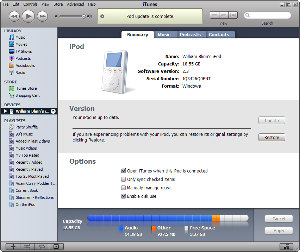
This is a new screen that shows the status of your attached Ipod at a glance. Nice! |
| |
|
|
 |
|
Deja vu! This looks a lot like Microsoft's Media Player. |
| |
|
|
 |
|
But this view is new. CD cover art displays and you can scroll through your collection. The control surfaces need a little help, though. |
| |
|
|
Is Apple spying on Microsoft?
When the latest version of Microsoft's Media Player was released a few months ago, I commented on the album view. Now Itunes has something similar -- and there's now a Cover Flow view that allows the user to scroll through CD covers that Itunes can automatically download from the music store. This view still needs some refinement. It seems a bit slow and decidedly jerky. If you're listening to a specific CD, switching to the large cover art view enables the entire music library so instead of hearing the next track on a Pat Benatar CD, you could find yourself listening to Barenaked Ladies, the Berlin Philharmonic, or Spanky and Our Gang.
Mind the gap
Some CDs, such as live concert albums and classical albums, are meant to be played straight through, with no fading between the tracks. These albums don't sound good if you turn on the cross-fade feature. A new bit of information that Itunes tracks is whether a track is part of a gapless album.
If you tell Itunes that the track is part of a gapless album, it will automatically turn off the cross-fade feature when you play those albums.
Overall: Five cats for Itunes, but it's still not "the best Windows app ever".

Although Apple insists on playing games by forcing the user to disable Quick Time and some of the new features need a little work, Itunes continues to be the best music player available at any price – even free, which Itunes is. Itunes 7 for Mac and Windows is available from Apple's website.
IE7 (Slowly, I turned ...)
Assuming you have Microsoft's automatic updates turned on, one day in the not too distant future you'll find that Internet Explorer 6 has been replaced on your computer with Internet Explorer 7. Microsoft has been beta testing this new version since sometime in 2005. My preferred browser is Firefox (soon to be available in version 2), but I've been looking at IE's new interface. The coming Vista operating system, Office 2007, and IE 7 will represent sea changes for users, so now would be a good time to lay in some life preservers.
The interface will be changing, and significantly. I've seem some of the Office applications and the new interface is decidedly different from what we've seen before. Power users will probably have the most trouble adapting to the new versions because the interface is so different from what they're used to.
One of the goals with IE apparently was to simplify the interface and to provide more real estate for the content. That's good, but the menus are entirely gone.
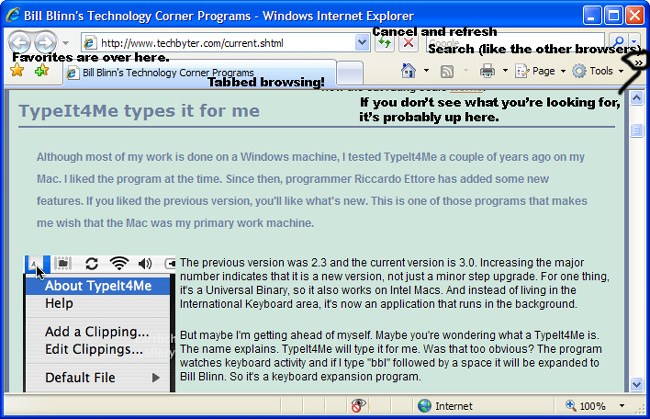
- Favorites and Add To Favorites are positioned to the left of the first tab.
- Additional tabs (websites) expand to the right.
- Refresh and Cancel are located in a place where you might not look for them.
- As with other browsers, IE 7 now offers a built-in search function. You can specify the default search engine.
- Home page, RSS, Print, Page, and Tools menus are evident.
- Less evident are are other menus hidden under the >> marker.
Microsoft has eliminated, moved, or reduced much of the "junk" that used to get in the way so that those who are still using 800x600 screens stand some chance of seeing the content. The irony is that virtually no user has a monitor less than 1024x768 these days and turning clear menu items into mystery-meat icons could make the interface harder to understand.
Microsoft says that it has done extensive usability testing on its new interfaces and I'm sure that is the case. That doesn't mean that the new interfaces will be accepted without question, though. Professional whiners will undoubtedly say that the old way was better. I don't have enough experience with the coming versions to say with certainty that it's better or that it isn't.
Overall: I'll still use Firefox or Opera, but IE is better than it was. (3 cats)

Firefox works with most of the sites I visit and its free extensions allow me to make the browser do what I want it to do. IE7 has the equivalent of extensions, but many of them will not be free. Besides that, it's still the main target for cyber creeps because it's the largest target. At some point you'll have this browser on your computer. If you prefer to do it sooner rather than later, see Microsoft's IE website for IE7 release candidate 1.
"Slowly I turned?"
"Slowly I Turned" is the most common name associated with a popular vaudeville sketch that has also been performed in cinema and on television. Comedian Joey Faye was the author of this act, which is also seen in Gents without Cents (The Three Stooges) and Lost In A Harem (Abbott and Costello) as well as in various clown routines, The Ballet (Lucille Ball), and even a 1990 song called Don't Call Me Dude by Scatterbrain.
Wikipedia has the rest of the story: The routine has two performers pretending to meet for the first time, with one of them becoming highly agitated over the utterance of particular words. Names and cities (such as Niagara Falls) have been used as the trigger, which then send the unbalanced person into a state of mania. While the other performer merely acts bewildered, the crazed actor utters the words, "Slowly I turned...step by step...inch by inch...", as they approach the stunned onlooker.
Reacting as if this stranger is the object of their rage, the angry actor begins hitting or strangling them, until the screams of the victim shake them out of their delusion. The actor then apologizes, admitting their irrational reaction to the mention of those certain words. This follows with the victim innocently repeating the words, sparking the insane reaction all over again. This pattern is repeated in various forms, sometimes with the entrance of a third actor, uninformed as to the situation.
This third person predictably ends up mentioning the words and setting off the manic performer, but with the twist that the second actor, not this new third person, is still the recipient of the violence.
Now you know.
Highly trained dogs sighted
Not long ago, I read an article about the use of highly trained dogs in business. The writer used this as an explanation for why stupid things happen. She had sent her Internet service provider a change of address notice. She had a dial-up account that wasn't associated with a particular address as high-speed services are. The ISP closed her account. When she called to complain, she was told that she'd asked them to close the account. The explanation: Highly trained dogs. The dogs can't read, of course, so they have to work by sense of smell and apparently a "change of address" letter smells a lot like a "cancel this account" letter. Since then, I've noticed several organizations that employ highly trained dogs.
Buy.com's highly trained dogs work in customer service
I've been a fan of Buy.com for quite a while and I've made many purchases from the company -- but sadly the company seems to have replaced its customer support staff with highly trained dogs who aren't quite capable of reading messages sent to them. They try to reply, but -- let's face it -- even highly trained dogs don't communicate well in English, particularly when they haven't understood what's been asked of them.
A 1980s television version of Alice in Wonderland is out on DVD. This is a program with Red Buttons, Ringo Starr, and a host of others. It's a fun production that my older daughter always liked and so did I. I found what appeared to be that version on Buy.com, checked against other websites to confirm that the box Buy.com displayed was the one I wanted. It was.
But it wasn't. The version I received was an animated program. I didn't realize that until after I opened the box and put it in the DVD player. I wrote to Buy.com's support address and explained the problem. I was told to return it and they would replace it, so I filled out the RMA request, indicating that I wanted a "replacement". After sending the DVD back, I searched Buy.com's website and was unable to locate the DVD that I wanted in exchange. But I did find it on Amazon.com.
I ordered the DVD from Amazon.com and wrote to Buy.com: "I have returned Alice in Wonderland/Alice-Through the Looking Glass 2pk. Initially I had requested replacement with the proper item, but it seems that you don't stock the item I wanted. I have found the one I thought I was ordering at Amazon. Instead of replacement, then, I would prefer a refund. Thank you."
Three days later, "Charles" (ever notice that customer support people rarely have last names or other identifying characteristics?) responded: "We are currently waiting to receive your product with RMA #2040503. The carrier is allowed 14 business days to deliver the product back to us. Once it has arrived at our warehouse, it takes 3-5 business days for an RMA to be processed. At the time an RMA was issued you had the option of a replacement order or a refund for the return. Since a replacement order was requested, it will be generated once the warehouse has processed the RMA. Please feel free to contact us with any future shopping needs."
There are two possibilities:
- "Charles" thinks I'm wondering where my "replacement" is because he was unable or unwilling to read my brief (53 words) message, or
- "Charles" would like me to believe that Buy.com's customer service department is incapable of changing course once it has been set in motion.
The implications of these two possibilities are:
- "Charles" is a fool, or
- Buy.com's customer service department is run by fools.
My reply to "Charles" wondered "What part of 'you don't stock the item I wanted' and 'instead of
replacement, then, I would prefer a refund' was unclear?"
To clarify, I restated the situation: "You don't have what I wanted. I am returning it. I requested a replacement when I thought that you had the object I thought I was ordering. Because you don't have the item I ordered, it would seem to me that a refund would be appropriate."
Have I had a response? No.
Do I expect a response? No.
Often, the people in charge of a company view a somewhat larger picture than the "Charles" types who are misfit into "customer service" positions, so I've also written to Neel Grover, Chief Executive Officer, Buy.Com, Inc., 85 Enterprise Suite 100, Aliso Viejo, California 92656.
I'll let you know what happens.
The Illinois Attorney General may not be a highly trained dog,
but her staff certainly makes her look like one
I bought a USB portable hard drive for younger daughter Kaydee to use at the Columbus College of Art and Design. The model I selected had a Hitachi hard drive in it. When the drive failed after a few months, I contacted the merchant in Chicago and was told that I could return the assembly for replacement.
On careful reading of the message the company sent, I learned that Hitachi drives weren't included in the company's 3-year warranty program and that I would have to obtain the replacement from Hitachi. Hitachi wanted a serial number, so I opened the enclosure and found ... a Samsung disk drive.
When the merchant didn't reply to my request for additional information, I filed a complaint with American Express and with the Illinois Attorney General. The IAG sent a request for information to American Express and, despite my continued efforts to make the IAG aware that my complaint was not with American Express, the trained dogs working for the IAG continued to bug American Express.
Eventually the vendor replied, promised to replace the unit I purchased with one that contained a drive made by Hitachi, and followed through. I advised all parties that the case was closed. That made it a bit surprising when, several weeks later (mid September 2006) I received 2 letters on the same day from the IAG (click either letter for a larger view). Note that one was "written" on August 2 and the other was "written" on September 11, but both arrived on September 14.
 |
|
 |
| This letter is dated August 2, but it arrived in mid September. It was signed by "Dolores Rodman". |
|
This letter was dated September 11, but it arrived on the same day as the letter at the left. It was also signed by "Dolores Rodman". |
Click either letter to see a larger version. Unlike previous letters (several) from the Illinois Attorney General, these letters at least reference the name of the company that sold the drive (Flash Memory Store) instead of the credit card that I used to purchase the drive. The second letter asks me to tell the highly trained dogs at the Illinois Attorney General's office how much money they saved me. This is clearly a political ploy.
Note: I have been accused of giving Democrats a free ride. I don't know if Lisa (why do I want to think "Elvira"?) Madigan is a Republican or a Democrat (given that this is Illinois, I would suspect that she's a Democrat), but I do know that I strongly suspect her office is run by highly trained dogs.
Nerdly News
Are the Feds really losers?
Earlier, I reported statistics on computers that the federal government (including agencies such as the FBI) have lost. The Commerce Department may be the winner in this category, having lost 1137 notebook computers since 2001. Most, according to the Associated Press, were assigned to the Census Bureau.
No personal information is "known to have been improperly used" says the Senseless Bureau, even though many of the computers contained personal data. Commerce Secretary Carlos M. Gutierrez says the "vulnerability for data misuse is low." I mean, after all, who would want to know where you live, what your salary is, or any of the other information the Senseless Bureau might have?
Should the Feds be allowed to take computers out of the office?
Remember the VA's missing computer? A notebook computer with information about 26.5 million veterans and active-duty troops was stolen by a burglar from the home of a VA employee. The agency later recovered the computer and apparently the burglar was sufficiently stupid that he never managed to use any of the personal data on the machine.
Have these guys never heard of encryption? If you have sensitive data and you take it home, it should be encrypted. D'oh! This is not rocket science, folks!
HP continues in damage-control mode
Patricia Dunn, who announced earlier that she would resign at the end of the year is out. Mark Hurd, who replaces Dunn, made the announcement and admitted that he had not read a report on the spying campaign -- a report that had been prepared for him while the program was still in operation. Two other executives -- those who supervised the investigation -- are also reported to be leaving.
The operation used direct surveillance of board members and journalists (questionable, but legal) but seems also to have illegally obtained phone records of those board members and journalists in an attempt to locate a leak. HP also is accused of attempt to load spying software on a CNET reporter’s computer. And there was an effort to infiltrate news organizations with HP employees.
Trying to find and stop information leaks from a corporation is, of course, both reasonable and proper. When that investigation begins breaking the law, it is no longer legal or proper.
|