WTVN Radio • Columbus, Ohio • Sunday morning from 8 until 9
Who's in the corner?
Is this information useful? If so, consider
making a contribution, please.

|
|
WTVN Radio • Columbus, Ohio • Sunday morning from 8 until 9 |
|
| Home
• Previous
page Who's in the corner? |
Is this information useful? If so, consider |
|
| |
Sunday, February 29, 2004
|
Random thought:
|
 |
|
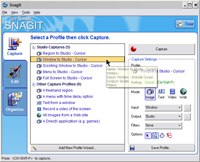
A picture is worth 1,920,000 pixelsThat's how many pixels are on my screen at the office because I run the monitor at a resolution of 1600x1200. At home, it's a mere 1,310,720 pixels because I run that screen at 1280x1024. Remember when 640x480 (307,200 pixels) was "high resolution"? When I want to include an image of a screen on the Technology Corner webiste to illustrate how a program works or what something looks like, I always turn to SnagIt -- the same screen capture program I've used for more years than I like to think about. The last time I wrote about SnagIt (January 2002), TechSmith had just released version 6 of the program and I wrote "I used to say that the best screen capture program ever was SnagIt 5, but no more. Now I have to say the best screen capture program ever is SnagIt 6. The folks at TechSmith somehow found a way to make an outstanding application even better." And SnagIt 6 was a remarkably good application. I thought it couldn't get any better until TechSmith sent me a copy of SnagIt version 7. Now I'm sure it can't get any better than this. If you need to capture screen images for documentation or to to illustrate a technique, you need SnagIt 7. There is nothing better. At least not until TechSmith comes up with version 8. I would say that SnagIt 7 is the best screen-capture application ever, but I'm sure the folks at TechSmith would prove me wrong in about a year. So I'll just say that it's the best screen capture program on the planet at this moment. And it's for Windows computers only. If you have a Mac and you need a screen-capture application, check Ambrosia Software's Snapz Pro X (if you're running OS X) or their Snapz Pro 2 if you're running System 7, 8, or 9.
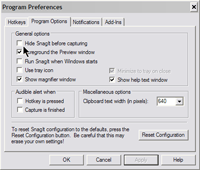
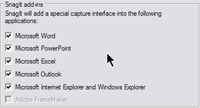
One thing that the TechSmith techies improved from version 6 to version 7 is the ability for SnagIt to see itself. In most cases, you'll want SnagIt to disappear when you're capturing a screen. Not if you want to show somebody how SnagIt works, though. In the past, documenting SnagIt or reviewing SnagIt required using some other (less capable) screen capture program to snag SnagIt. One of the coolest new features is the ability to switch from one capture mode to another with a simple click. Notice that I have 5 options for capturing a screen to the Studio (more about that in a bit) in addition to a bunch of other profiles. If I need a full-screen capture one moment and a menu the next, it's easy to reconfigure SnagIt on the fly. You may have noticed that the number of screen-capture illustrations has increased recently. You may think SnagIt 7 is the reason. You would be right.
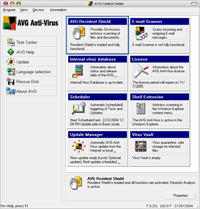
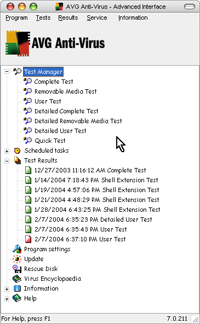
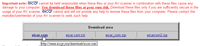
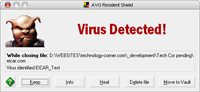
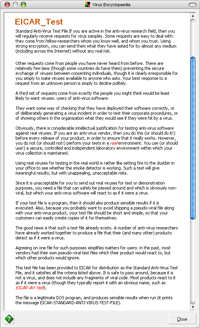
For more information, see www.techsmith.com. Which antivirus program works for me?If you're operating a computer without an antivirus program and a firewall, even if you're on a slow dial-up line, you need to re-think your strategy. Apparently every creep on the planet has discovered how to write viruses and worms. If these things were once funny (and I say they were never funny) then that time is long past. Norton Antivirus probably is the most used antivirus program, but that doesn't make it the best. There is, in fact, some debate possible about what makes an antivirus application "the best". Buying the Symantec/Norton product is quick and easy, but the resident part of the program consumes significant system resources. Norton is not the best choice for people with older, slower computers. By "slower", I mean any computer with a CPU that runs at less than about 2GHz. Owners of faster computers won't see the performance degradation that owners of slower computers will see. But even those who own the fastest computer will see some performance hit if they choose the market leader. For the past two years or so I've been using Grisoft's AVG Antivirus program. When I've recommended it to friends, their usual response -- after removing Norton Antivirus and installing AVG -- is something like this: "Wow! My computer is so much faster now!" This is usually followed by, "Are you sure this is working?" And the answer to that is, "No, but it seems to work for me." Use wetware for complete protectionOne important point about protecting your computer from viruses, worms, and trojans is this: The best antivirus application resides in the space between your ears. No antivirus application on a computer is perfect. In part, this is because it takes time for the antivirus company's programmers to recognize malware, it takes time for the antivirus company's programmers to determine how the malware works, it takes time for the antivirus company's programmers to develop a protection strategy for any given malware, and it takes time for the users (you and me) to download and activate the new antivirus definitions. During the 24, 48, 72, or more hours that transpire between the time some creep releases a trojan, virus, or worm and the time your antivirus program installs the latest update, a lot of damage can be done. That's why the wetware between your ears is so critically important. THINK! If you receive an e-mail that claims to be from your boss, who usually writes letter-perfect messages, and it says "hEY dud3, chek out the p0rn on this sit3", the reasonable, rational response might be to assume that the message is not really from your boss, regardless of what the message claims. In short, you should never depend entirely on any antivirus application to protect you. But even though the most important part of your protection system is your brain, it's still a very good idea to have an antivirus application running. For me, that application is Grisoft's AVG Antivirus. AVG Antivirus from GrisoftCLICK ANY OF THE IMAGES BELOW FOR A LARGER VIEW.
AVG is available in both free and paid versions. The free version is surprisingly robust considering its cost. The paid version provides a better interface with more controls. But if you're on a tight budget, consider the free version. You'll get daily updates and the same kind of protection paid users get. For a few dollars (less than $35) you can buy the professional version of AVG for a single Windows PC and that includes two years of updates, not just one. Grisoft also has products for Windows servers and for Linux. If you need technical support after purchasing AVG, you'll be surprised by how quickly Grisoft responds. It's easy for a techno-journalist to say this. When companies send us their wares, they're careful to provide quick and accurate support. But I've also heard from AVG users who have asked Grisoft for help and who have received accurate replies within a few hours. My theory is that Grisoft is still small enough to care about individual customers. Grisoft usually isn't the first company to identify a new virus, worm, or trojan and have a removal tool available, but I don't object to that because the company is rarely more than a few hours behind the competition, because I trust my own "wet-ware" to protect me, because AVG doesn't slow my computer, and because AGV has trapped and destroyed every infected message I've received.
For more information, see www.grisoft.com. Nerdly NewsWinZip 9 is ready for downloadThe long awaited update to WinZip is ready for download and the company continues is astonishing policy of providing free updates to any licensed user of any previous English-language version of the product. Yes, that means you might have spent $30 for version 1 of WinZip and you will have received versions 2 through 9 for no additional charge. And for those who like command-line zip utilities, WinZip has added a command-line add-on. And yes, you can download that for free, too. If you haven't purchased WinZip, the new version is $29 and the company offers volume pricing discounts for companies and other large institutions. For 500 or more computers, the price is just $4 per seat. WinZip is probably the most-used data-compression utility for corporate and home users. It's always been easy to use because it integrates itself into the Windows Explorer, but power users often prefer the "classic" interface. When you install the program, you can choose which you prefer, but you can switch from one to the other anytime. At the risk of sounding like a late-night info-mercial, WinZip 9 also includes -- at no increase in price -- data encryption capabilities that supports both 128-bit and 256-bit Advanced Encryption Standard (AES) techniques. There's also support for 64-bit extensions to the Zip file format. This essentially removes size restrictions on zip file capacity You'll find WinZip at www.winzip.com. Do the terms "Bill Gates" and "computer security"
|
||||||||||||||||||||||||||||
|
|
Privacy Guarantee:I HATE SPAM and will not sell, rent, loan, auction, trade, or do anything else with your e-mail address. Period.
|
This is the only ad you'll ever see on this site. It's for my website host, BlueHost in Orem, Utah. Over the past several years, they have proven to be honest, reliable, and progressive. If you need to host a website, please click the banner below to see what BlueHost has to offer. As if you didn't already get enough weather on the radio! Annoying legal disclaimer
[an error occurred while processing this directive] |
||