
| Home • Previous page | Do you use a pop-up blocker? If so, please read this. |
August 28, 2005 |
WTVN Radio • Columbus, Ohio Sunday morning from 8 until 9 |
| Important disclaimer: | |
The story from New OrleansFirst the storm, then the flood. The misery continues in New Orleans and one of the best windows to the story is the ongoing coverage by the New Orleans Times-Picayune. For the first 3 days after the storm, the paper was unable to publish, but the heroic reporters, photographers, and writers did manage to create a newspaper in PDF format and post it on NOLA.com. On September 2, a paper-and-ink version returned, but the Web-based PDF version continues. I know that much of the television coverage has been dramatic, but sometimes words on paper (or at least on the screen) and stark photographs provide the best way to comprehend the scope of a disaster. For me, that was certainly the case this time. The back issues of the hurricane-flood editions are still on-line at http://www.nola.com/hurricane/katrina/ and, although they're painful to look at, the accounts are compelling. They are even more so when one stops to think that these accounts were created by the people who live in New Orleans -- people who may have lost family members, pets, or homes to the disaster. People who probably wished they could take the time to get their own lives in order, but who felt it was important to record the event. I have been unable to verify this, but I'm told that this is the first time since the Civil War that the newspaper has been unable to publish a regular edition. This is not to downplay in any way the heroic efforts of police, firefighters, and other emergency workers, but without the reporters and photographers, many of their stories would not be known. If you want to help, here are some ways
Opera ... the melody lingersBrowsers keep getting better. Microsoft's Internet Explorer hasn't been updated in several years and still doesn't have tabs. It will in the next release, which is already out in beta, but not yet. If you like tabs, and apparently a lot of people do, you can choose Netscape, Firefox, or Opera. Although my primary browser remains Firefox because of the prodigious number of extensions available for it, Opera would be the right choice for a lot of people. Opera alone is the browser you must pay for* -- with money ($40, $20 if you're a student, or $15 if you're upgrading) or with your eyes (Opera can run in sponsored mode and display small ads). I may have chosen Firefox because I can add extensions such as Leet Key, HTML Validator, Javascript Debugger, and ColorZilla, but I know that most users couldn't care less about those features.
Most people probably want speed and security. That is exactly what Opera set out to provide with version 8. Opera has always has, as a primary goal, compliance with the W3C standards. Some of the earlier versions were a little buggy. I think it was version 5 that I was never able to review because it opened and immediately closed. Those days are long gone. Version 6 was an impressive piece of work. Version 7 built on version 6's successes. And now we have version 8. Opera's developers are also aiming for cross-platform compatibility. The browser is available for Windows, Mac, Linux, Symbian, Windows Mobile, BREW, QNX, TRON, FreeBSD, Solaris, and Mediahighway operating systems. The two keys are speed and securitySpeed has been Opera's strength from the beginning. When other browsers were 30 and 40 MB downloads, Opera was 3. It's still less than 4MB, so it's a fast download, even for dial-up users. Because there's less code, the browser is fast, too. Security is a big issue with many Internet users these days and Opera 8 includes information in the address bar that requires an extension in Firefox and isn't available in IE. Opera also makes it possible to delete the browser's record of passwords and other log-in information.
A little magic
And that's just scratching the surfacePop-ups can be annoying, but we use them at Technology Corner to display larger views of images. If you've closed one and want to see it again, Opera makes it easy. Click on the gray trash can in the upper right corner of the browser and you'll see a list of closed (or blocked) pop-ups. Choose one to see it again. Opera, of course, has tabbed browsing. Opera was one of the first browsers to offer tabbed browsing. The developers also provide "Sessions", which make it possible for Opera to open any (reasonable) number of websites with a single click.
Linux, open source, and other Microsoft terrorsLInux is still not the operating system for my desktop computer or my notebook computer, but it's more than adequate for a lot of people, particularly with the advent of Open Office 2.0. The latest beta version (1.9) is good enough and complete enough that I would consider using it. It is perfect? No, and this isn't really a full review. It's more of an initial look and the initial look suggests that it might be good enough for a lot of users. Still, if you need all the features that Microsoft Office provides, you'll want Microsoft Office instead of Open Office. Open Office is based on code donated by Sun Microsystems when it acquired Star Division in 1999. The open source Open Office Organization has developed the application and provides support through a community of volunteers with Sun's sponsorship. Open Office is available as a free download for Windows, GNU/Linux, FreeBSD, and Sun's Solaris operating systems. Obviously absent is Apple's OS X. Open Office will run under OS X, but only after the user installs the X11 windowing system. X11 is an antique technology that was designed to solve a problem that never existed and creates problems that should never have occurred. So if you're a Mac user, you'll probably want to continue to steer clear of Open Office. But if you're a Windows user or someone who's running Linux, the latest version is worth paying attention to. Playing "chicken": Microsoft and Open Source Development LabsMicrosoft recently challenged the Open Source Development Labs to a duel. Microsoft offered to pay for part of a research study to establish a "fact-based analysis" of Windows as it relates to Linux and asked OSDL to pay for the rest. No dice, said the head of the OSDL, but a few days later he suggested that Microsoft consider creating Office for Linux. Both sides were bluffing, of course. Microsoft should consider making Office available to run on Linux, said the head of the OSDL, because this would be particularly helpful for those Global 2000 customers with a large number of Linux servers. Needless to say, Microsoft isn't interested. Not even a little bit. This isn't an impossible task, of course. Microsoft has probably already done it, but it's not something likely to see the light of day anytime soon. If Office was available for Linux, what would happen to the sale of Windows? But it might not make any difference in the long run. The latest version of Open Office is good enough for a lot of people. Some countries are abandoning Microsoft software in favor of open source software such as Linux and Open Office. More ominously, from Microsoft's perspective, is decisions such as the one that will move Massachusetts state workers away from Microsoft Office and onto Open office. All electronic documents created by state employees in Massachusetts must use open formats starting in 2007. That means document will be be in PDF format or Open Office formats. The goal is to ensure that every citizen of Massachusetts can open electronic documents. "But wait!" you say, "Microsoft will use XML for the next version of Office." True, but the XML, while readable by any text editor, will include proprietary elements and that means Office will be explicitly excluded under the Massachusetts plan. Why is Microsoft worrked? The Office suite – Word, Excel, PowerPoint and Outlook – generate about 30% of Microsoft's revenues and about 40% of the company's operating profits. Nerdly NewsHere's a big surprise: Creeps are taking advantage of KatrinaWeb security firm Websense says a malicious website that poses as a Katrina news site includes JavaScript that tries to exploit two Internet Explorer vulnerabilities. If you visit the site with an unpatched version of IE, the site will install a Trojan horse application. The code is similar to that used in August as part of an Iraqi news scam, but this version allows the author to create pseudo-polymorphic code that changes the file each time it infects a computer. By doing this, it becomes harder for antivirus programs to spot. The Trojan the installs spyware and a keylogger. If all this sounds familiar, it's because this is the same ploy used after the tsunami in Asia, which suggests the mindset, the morals, and the ethics of the creeps who set up these sites. Websense says it has found more than 100 sites that use some combination of "katrina", "donate", and "disaster". Some may be legitimate, but many aren't. If you want to donate to the relief efforts, the use a legitimate, known organization. Police in Turkey arrest 16 more worm suspectsSixteen suspected arrested in Turkey are accused to assisting in the Zotob and Mytob worm outbreaks. Earlier, 21-year-old Atilla Ekici, was arrested in Turkey. Police say he paid a resident of Morocco to write the Zotob worms, which disrupted some major organizations. The threat is real and continues to become more serious. Most worms and viruses today are designed to steal information or hijack the entire computer for illicit use. The good news is that police seem to be getting better at tracking down the crime slime and police agencies around the world are finally realizing that fighting this kind of crime takes a more concerted effort at cooperation than they are used to. Let us know what you think. Write to:
|
|||||||||
 |
Have a question? Ask it and you might pick up a prize for stumping the chump. Send your question to . And ... good luck! |
Privacy Guarantee:I HATE SPAM and will not sell, rent, loan, auction, trade, or do anything else with your e-mail address. Period. |
Is this information useful? |
|

Joe(Photo by Sally) |

Bill(Photo by Scampi) |
|
As if you didn't already get enough weather on the radio! This is the only ad you'll ever see on this site. It's for my website host, BlueHost in Orem, Utah. Over the past several years, they have proven to be honest, reliable, and progressive. If you need to host a website, please click the banner below to see what BlueHost has to offer. Annoying legal disclaimer [an error occurred while processing this directive] |
||
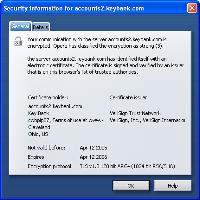
 When I go to my bank's site, Opera displays a padlock icon in the address bar and also adds a small yellow indicator at the right of the address bar. That indicator shows the name of the organization that owns the certificate for the site. If you accidentally follow the link in a phishing e-mail, maybe you'll notice this information isn't there. Click on the bar for more information about the validity of the certificate.
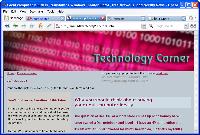 Take a site such as Technology Corner. We assume you have a monitor that's at least 800 pixels wide. If you do, that's fine. If not, or if you run the browser in a small window, maybe you have to scroll left to right when you visit the site. Not with Opera.
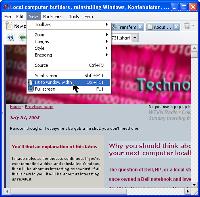 Choose View, Fit to Window and the page (including graphics) are resized to fit the available screen. In addition, the entire browser interface is reduced to fit the available screen.
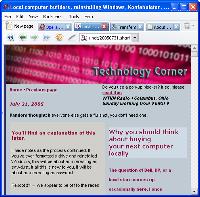 To undo this view, choose View and deselect Fit to Window. Should you want to view the website the way someone using a handheld device would see it, choose View, Small Screen.
 8 CATS: Even if you missed the opportunity to get Opera for free, it's still a good choice and you can accept Opera with small ads instead of handing over cash for it. Opera handles a lot like a sport car, with quick acceleration and good handling.

