
| Home • Previous page | Do you use a pop-up blocker? If so, please read this. |
April 17, 2005 |
WTVN Radio • Columbus, Ohio Sunday morning from 8 until 9 |
| Important disclaimer: | |
Three of a kind from Karen KenworthyIt may be a surprise to Harvard President Lawrence Summers, but one of the most insightful writers and programmers I know of is a woman. Karen Kenworthy wrote many columns for Windows Magazine for a decade and hers was one column that I always read and usually agreed with. Listener Rick Bagby suggested that I take a look at one of her utility programs, the Registry Pruner. When I visited the website (www.karenware.com) to download the utility, I noticed three others that looked interesting and downloaded them. The programs:
Visit Karen's website and you'll find more than two dozen utility applications. If you've listened to the show for more than a few weeks, you probably know that I like utility applications and the people who write them. Utilities generally are useful functions that aren't included in the operating system. WhoisTake "whois" for example. I can go to the Windows XP command line and type "whois techbyter.com". The command interpreter will immediately tell me "'whois' is not recognized as an internal or external command, operable program or batch file." Sam Spade and CyberKit include the whois function, but Karen's is faster and easier. If I give Karen's utility the domain name, it tells me: Domain Name: techbyter.com Registrar: GO DADDY SOFTWARE, INC. Whois Server: whois.godaddy.com Referral URL: http://registrar.godaddy.com Name Server: NS.IP-SYS.COM Name Server: NS2.IP-SYS.COM Status: REGISTRAR-LOCK Updated Date: 11-nov-2004 Creation Date: 21-jul-2003 Expiration Date: 21-jul-2005 and Registrant: William Blinn Communications 179 Caren Ave Worthington, Ohio 43085 United States Registered through: GoDaddy.com Domain Name: techbyter.com Created on: 21-Jul-03 Expires on: 21-Jul-05 Last Updated on: 21-Jul-03 But if I give the utility an IP address (63.247.129.10, for example), I can find out more about where the website is located and who owns the actual server: OrgName: DNS Services OrgID: DNSSE Address: 1643 Mallory Street City: Jacksonville StateProv: FL PostalCode: 32205 Country: US NetRange: 63.247.128.0 - 63.247.143.255 CIDR: 63.247.128.0/20 NetName: DNSSE-NETBLK-1 NetHandle: NET-63-247-128-0-1 Parent: NET-63-0-0-0-0 NetType: Direct Allocation NameServer: NS.HMDNSGROUP.COM NameServer: NS2.NMDNSGROUP.COM Comment: RegDate: 2003-04-11 Updated: 2004-08-05 OrgTechHandle: TECHN173-ARIN OrgTechName: Technical Services OrgTechPhone: +1-877-643-1083 OrgTechEmail: tech@hmdnsgroup.com Whois is pretty basic stuff. That's about all there is to this application. LAN Monitor
The program also shows all current connections between your computer and others on the local network, or the Internet. It also displays real-time traffic statistics, including bytes sent and received, transmission errors, and network connection load factors. The Adapters panel shows inforamtion about (surprise!) the adapter. You'll find your current IP address, the DNS servers you're using, the speed of the connection, the IP address of your DHCP server, and more.
The application provides lots of statistical information. IP Stats
TCP Stats
UDP Stats
ICMP Stats
Registry PrunerThis is the application Rick Bagby suggested that I take a look at. Before we proceed, I should issue two warnings.
Shared DLLs
Add/Remove
Libraries and the futureIn early March, I experienced a day of convergence and serendipity. It was a day that caused me to think about libraries – how they operate today and how they'll operate 5 years from now.
So I visited www.WorthingtonLibraries.org where I learned that the Mid-Ohio Library Digital Initiative (MOLDI) is the result of work by the Grandview Library. (This isn't surprising. The Grandview Library has always been known as a key source of audio-visual materials.) Without even visiting the library, you can check out audio books online and download them directly to a personal computer. All you need is an Internet connection and a a bit of "wallet clutter" known as a library card. The Mid-Ohio Library Digital Initiative is a partnership of nine central Ohio libraries: Columbus Metropolitan Library, Fairfield County District Library, Grandview Heights Public Library, Marysville Public Library, Pickaway County Public Library, Pickerington Public Library, Upper Arlington Public Library, Washington-Centerville Public Library, and Worthington Public Libraries. Downloaded books can be played or viewed on a computer or transferred to a portable device (PDA, smart phone, or MP3 player) and you can burn the books to a CD. Users are allowed to check out 5 titles at a time, each for 14 days -- and to place an additional 5 items on reserve. Each book will check itself back in on its due date. This must be an exciting, frightening time for librariansLibrary services are changing because of technology. With the advent of broadband access and encryption codes for audio, library patrons can check out books even when the library isn't open. Some people wonder whether a person should get "credit" for "reading" a book when the book is an audio book the person "only" listened to. I'm not sure who's keeping track. Or why. If I listen to a book while I'm driving from home to the office and I learn something from it, I think that I've "read" the book. What's next?What about ownloading movies to a PC? Or maybe borrowing popular and classical music from an online library? Yes. These are exciting times for librarians. Library administrators see another advantage: Electronic books and audio books cost only half of the price of a hard copy, meaning great savings for libraries, and electronic copies never get lost or damaged.
NotBo (Notice Board) a no-go for nowThe message I received promoting the application was clearly written by someone who speaks English as a second language, but that's not a problem. I understood that sharing information with my "piers" did not require that I purchase a boat. NotBo is a Danish program that allows a user to exchange information (for free) with up to 2 additional people. The information you can share includes files, a calendar, notes, and links. According to NotBo, there are 5 good reasons to download the application:
But a manual would be helpful. NotBo's calendar appears to be rather limited. While you can create an entry, I couldn't find a way to create a repeating entry. I found that I could post links, but all participants appear to have access to the definition screen. On the notes page, I was offered all of the typefaces loaded on my computer but I couldn't find a way to actually use them. This is an application that might someday be one that you'll want to use. Today, though, it's overpriced, even though it's free. NotBo is a concept that may evolve to be useful. If you have 5 group members instead of 3, NotBo will cost you $6 per month. That's not bad. And if you need 15MB of storage instead of the 5MB provided for free, you're up to $11 per month. That's still not bad if you can share files, links, and calendar information with all members of your family. I hope the NotBo staff continues developing this application. Someday it will be well worth installing. Today, though, is not that day.
Visit the NotBo site. Nerdly NewsWe don't like spam, but we deal with it.A study by the Pew Internet and American Life Project says that the percentage of people who complain about spam has dropped from 62% last year to 53% this year. There's been a great gnashing of teeth as one writer after another assumes that people are beginning to consider spam another inconvenience -- equivalent to bad pet owners who allow their animals to use your lawn as their dumping ground, for example. While I'm still resolutely opposed to spam and sincerely hope that better law enforcement, technology, and intelligence will eventually win out, spam bothers me less this year than it did last year because I get less of it. If I still routinely received 400 pieces of spam per day, I would probably have stopped using e-mail by now. But I have several lines of defense between spammers and my mailboxes. As a result, some days no spam at all reaches my inbox. On a bad day, I might see 5 spams in the inbox. Granted, I do have to glance into the sludge bucket once a day, but even that box isn't as full as it used to be -- maybe 100 to 150 messages per day that take less than a minute for me to glance at and confirm that they're spam. The rest of the trash -- it's probably well over 600 pieces a day by now -- are identified and disposed of without any intervention by me. The study says e-mail with pornographic content is down, too. That's unfortunate because it's being replaced by fraudulent messages of all sorts. Porn merchants at least were honest about what it was they were selling. Surprise! A Trojan claims to be from Microsoft.If this really is surprising, it shouldn't be. Anti-virus vendors say you may see a new Trojan horse application in your e-mail and that it will claim to be a critical Microsoft security patch. The timing is right. On the 12th of April, the option not to have the Windows XP SP2 update installed automatically expired. Sophos Inc. says the attack attempts to direct recipients to a malicious Web site. Common subject lines (subject to change, of course) include "Update your Windows machine," "Urgent Windows Update," and "Important Windows Update." These are all good suggestions, of course, but only if you really go to Microsoft's website -- not the site some creep set up to steal your computer. If you follow the link to "Express Install: High Priority Updates For Your Computer," you'll get a backdoor Trojan that runs in the background as a server process. The first time the process runs, the Trojan copies itself to the Windows System directory as a DLL file (random name) with an .exe extension. When the service is running, it gives the sender complete control of your computer. Let us know what you think. Write to:
|
 |
Have a question? Ask it and you might pick up a prize for stumping the chump. Send your question to . And ... good luck! |
Privacy Guarantee:I HATE SPAM and will not sell, rent, loan, auction, trade, or do anything else with your e-mail address. Period. |
Is this information useful? |
|

Joe(Photo by Sally) |

Bill(Photo by Scampi) |
|
As if you didn't already get enough weather on the radio! This is the only ad you'll ever see on this site. It's for my website host, BlueHost in Orem, Utah. Over the past several years, they have proven to be honest, reliable, and progressive. If you need to host a website, please click the banner below to see what BlueHost has to offer. Annoying legal disclaimer [an error occurred while processing this directive] |
||
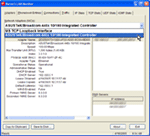 This is a complex utility that provides a lot of information. Much of it is "nice to know" information instead of "need to know" information. You'll see information about every network adapter on your computer, including its speed, IP address, DHCP Lease information, and more.
 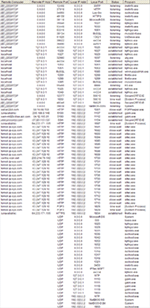 If you wonder how many connections your network adapter is dealing with, the Connections panel will show you. It may surprise you. The computer I use has a lot of processes running that need Internet access, but your computer may have a lot, too.
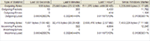 The Traffic panel will show you how much activity is occurring on your computer's network adapter. The network server and your computer will generate a certain amount of ongoing chatter, but if you see several megabytes of outbound traffic, you'll want to investigate.
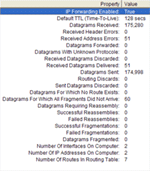 Internet Protocol (the "IP" in TCP/IP and UDP/IP) is the method used to move data from one computer to another on the Internet. Each computer on the Internet has an IP address that uniquely identifies it. IP is what's called a "connectionless" protocol. No continuing connection is maintained. Data packets (datagrams) move independently from one machine to another and may travel by different routes.
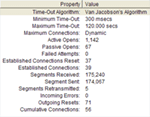 Transmission Control Protocol (TCP) provides the instructions used to move datagrams across the Internet. IP (mentioned before) is responsible for the delivery of the data and TCP keeps track of the individual packets or datagrams. When a series of datagrams arrive at your computer -- possibly not in the order they were sent -- TCP is the procedure that re-assembles them into proper order.
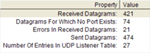 User Datagram Protocol (UDP) is an alternative to the Transmission Control Protocol (TCP), the better known Internet protocol. Together, TCP/IP and UDP/IP are the primary methods of moving units of data (packets are called datagrams) and then putting them back together at the other end. Unlike TCP, UDP doesn't keep track of the order in which the packets arrive, so the application that uses UDP must handle this task itself. UDP saves time when the messages involved are small. UDP also provides port numbers that distinguish between user requests.
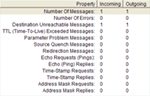 Internet Control Message Protocol (ICMP) is a message control and error-reporting protocol. It is used by both ping and traceroute (diagnostic tools) but because it can be misused, some hosts (such as a certain Internet service provider that must not be named) block ICMP packets. A little background on that: Attackers learned that they could crash a server by sending a single large ICMP packet larger than 65K if they broke the packet into smaller segments. This vulnerability was resolved in 1997 but some ISPs stubbornly (and illogically) continue to block it.
 NINE CATS: These are just three of the utilities Karen Kenworthy makes available on her website. Most are free to download, but a few are included only on the CD she sells for just $30. For more information, visit
  TEN CATS: What's not to like? You go in, look around, pick up goodies (books, CDs, DVD), take them home, and use them. Then you bring them back. Yes, I know we pay for the service in taxes, so it's isn't really "free", but it won't cost you any less if you don't use it.
  FIVE CATS: NotBo is a good idea, but not a well-executed idea. The programmers will probably continue to develop the Notice Board software and make it an application worth installing. That hasn't happened yet, though.

