
| Home • Previous page | Do you use a pop-up blocker? If so, please read this. |
April 10, 2005 |
WTVN Radio • Columbus, Ohio Sunday morning from 8 until 9 |
| Important disclaimer: | |
Who needs (or wants?) a CD player these days!We have CD players scattered around the house. In the family room. In my office. In Kaydee's room. A couple of portable units here and there. For the most part, they're unused. At the office office, I play music from an Ipod that contains (at last count) more than 4000 individual tracks. That's a big selection, but the computer in my home office has more than 9000 tracks. This includes a few hundred half-hour radio programs from the 1930s through the 1960s, a few audio books, a lot of rock music, a growing collection of jazz music, and several hundred classical selections.
What this means is that, as I'm working on the computer in the evening, I can listen to ...
What I've found is that the computer has change the way I use music. If I'm busy on a project at the computer, I'm loathe to stand up, walk across the room, and swap CDs. In addition to that, the stereo system is behind me, so left is right, right is left, and everything is off center. At the computer, I have a 5.1 sound system that gives me outstanding reproduction. It means that if I'm in the mood for Dixieland Jazz, I can find it. Or music by Weird Al. Or the Great Kat (chainsaw violin). Or soft country music by Chet Atkins. Or just about anything else. Fast. If I had to look through several hundred CDs (and probably not find the one I wanted because it's downstairs) I wouldn't bother. Making music easier to use had made me use more of it and that's a good thing because I like music. I just don't like the hassle involved in playing it the old fashioned way. And the cool thing is that – when I travel, should I decide that the 4000 tracks on my Ipod leave something to be desired – I can easily burn the entire collection to about 6 DVDs and carry all 9000 tracks along with my notebook computer (either a Windows machine or a Mac). Can you imagine traveling with your entire music collection – everything – in your briefcase! I can. Wow! If you're not yet using your computer to store and play music, now's the time to examine the possibilities. And if you want to send music across the room to your stereo, there are lots of options for that today, too. To give you an idea of the variety of music on my computer:
Firefox extensionsFirefox, the latest browser from the Mozilla Organization continues to be my favorite browser. For some people, security is the main "selling point" for Firefox. (Do free applications have "selling points"?) For others, it's tabbed browsing that Internet Explorer still doesn't offer. For me, it's both of these, and a combination of other built-in features (such as bookmarks) and a rich variety of extensions (such as the ability to synchronize bookmarks). I've talked about security and tabbed browsing previously, so today we'll look at bookmarks and extensions. Bookmarks are one thing that Netscape got right from the start. Microsoft decided to use "favorites" instead and each "favorite" is a file. Even when IE was the best browser going (which it was from version 4 until the release of Firefox) I said that Netscape had bookmarks right. Bookmarks were maintained in a single file that could easily be copied from one computer to another. Firefox takes that concept further down the road.
What if you could click a menu item on Firefox every time you add a bookmark and have it upload the latest bookmarks to an FTP server? Then you could download the bookmarks to your other machines, always assuming that what's on the FTP server is the definitive final copy? Better yet, what if you could tell Firefox to always upload its bookmarks when it closes and always to download the bookmarks when it opens? This is exactly what an extension called Bookmarks Synchronizer does and the extension is one of nearly 200 available for Firefox. Most of the extensions are provided without cost. At the right is the panel that shows all of the installed extensions. For a view you can actually read, click the image. Easy to use
I won't bore you with a description of every extension I use, but let's take a look at the ones that seem as if they would be particularly useful for most users. AdBlockThis is one that I've discussed previously, but it's the first extension many people will download. We generally don't mind static ads because we're used to seeing ads in magazines. When those ads begin to move around and make noise, the advertisers have gone too far. Our eyes are attracted by color and motion, so it's difficult to read text when there's an ad on the page that's equivalent to a small, impatient child who really needs to go to the bathroom. AdBlock eliminates these annoyances quickly and easily. ForecastFox
Hovering the mouse over the icon for current conditions provides a more detailed listing of the conditions. The user may specify which conditions are shown (temperature, humidity, wind speed, barometric pressure, and so on) as well as the location for which the information is shown. Hovering over the other two icons causes forecast information to appear. ROT13 encoder/decoder
ROT13 is still used by some people. If you encounter text that looks like the sentence in parentheses above and you have the ROT13 encoder/decoder installed, just swipe the text and right-click to see the real message. Copy Plain Text
Once you've installed the extension, all you need do is swipe the text, right, click, and choose "Copy as Plain Text." How to obtain extensions
Nerdly NewsLawsuits, anti-spam laws send OptInRealBig to bankruptcy courtIf you're like most people who have Internet access, you've received dozens or hundreds of messages from "OptInRealBig.com" or from one of its many other shadow operations. The company's website says "In most industries, especially in the Opt-in E-mail business, trust is the most vital, but surprisingly overlooked aspect of business. OptInBig and its employees not only understand this concept, but embrace and practice it on a daily basis." Despite that claim, most of the messages that came from the operation (claiming I had "opted in") came to an address I use only for registering websites. I had never subscribed to anything with that address or opted in for anything with that address. So much for honesty and trust. Scott Richter, the man behind the billions of spams, now says lawsuits have forced the company into Chapter 11 bankruptcy. The company is fighting many legal battles, including one against Microsoft. Microsoft wants millions of dollars in damages. Spamhaus says OptInRealBig.com is the world's 3rd largest spammer. Microsoft and New York attorney general Eliot Spitzer filed suits in December 2003, claiming that Richter and his accomplices sent billions of spam messages using 514 addresses in 35 countries. Richter settled the case with New York in July of 2004, but Microsoft's case continues. Richter claimed assets of less than $10 million and debts of more than $50 million. That includes the $46 million Microsoft is seeking, so Richter must believe that he will lose the case despite attorney Steven Richter's claim that the company expect to prevail. More from Google for less
Previously costing $4,995, the appliance now costs a bargain $2,995, which is a whopping price cut of $2000. This will make it far more affordable for small businesses who need to get the power of Google onto their networks. Moore's law is 40 this monthForty years ago, Intel co-founder Gordon Moore said the number of transistors on a computer chip would double every year. Later, he changed that to 18 months. The 1965 prediction was an elegant statement of how semiconductor chips would become cheaper, faster, smaller, and more reliable over time. Moore's Law has been said to be dead several times, but it continues to perform. Even so, it won't last forever. Physics will eventually make it impossible for Moore's law to continue applying. When? Maybe 10 years. Maybe 20. The number of transistors on a single chip can't double every 18 months indefinitely. Will something replace silicon semiconductors? Moore, 76, is Intel's chairman emeritus. In 1990, the first President Bush awarded him a National Medal of Technology. Let us know what you think. Write to:
|
 |
Have a question? Ask it and you might pick up a prize for stumping the chump. Send your question to . And ... good luck! |
Privacy Guarantee:I HATE SPAM and will not sell, rent, loan, auction, trade, or do anything else with your e-mail address. Period. |
Is this information useful? |
|

Joe(Photo by Sally) |

Bill(Photo by Scampi) |
|
As if you didn't already get enough weather on the radio! This is the only ad you'll ever see on this site. It's for my website host, BlueHost in Orem, Utah. Over the past several years, they have proven to be honest, reliable, and progressive. If you need to host a website, please click the banner below to see what BlueHost has to offer. Annoying legal disclaimer [an error occurred while processing this directive] |
||
 Access to music has never been easier, faster, or better. In the old, old days, I had to put 45s on one of those old RCA changers. (If you're old enough to remember those, you're old.) Then came 33s that played 20 to 30 minutes worth of music per side. I spent a great deal of time adding individual tracks from LPs to "mix" tapes and dubbing them to cassettes that I could listen to as they jammed in the car. The next big advance was CDs and, when computers could burn CDs, I could make my own hour-long mixed that I could play in the car. CD players that could handle MP3 files made it possible for me to put 100 or more selections on a single CD (great for listening in hotel rooms when I travel). But the real change came with devices such as the Ipod that carry thousands of selections in a package the size of a deck of cards. And the ability, at home, to give myself nearly immediate access to 9000+ selections. At the right side of this paragraph is a picture of my Itunes directory.
  Yes, I really do have all those artists on the computer. Yes, I really do listen to all of them. Sometimes in a single evening. I have somewhat eclectic musical tastes. You'll notice that there's no opera and not a lot of twangy country music. I have a theory about that: operatic music and country music use the same subject matter; the only differences are the range of the fat lady. Also I like playing cuts by Charlie Daniels and the Dixie Chicks back to back and wondering how well they'd get along if they had to share a stage someday.
 EIGHT CATS: Steve Jobs likes to call Itunes the best Windows program ever written. It's free and it's good, but it's not the best Windows application ever written. Winamp can play all the files that Itunes can play, except for rights-managed files. Musicmatch can do an adequate job, but not with any AAC or MP4 files. As for players themselves, you'll find players that hold more music and play longer on a battery charge than an Ipod, but the Ipod is still the king when it comes to ease of use.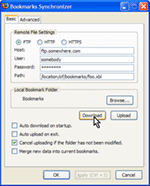
 What do you do if you have an office computer (Windows), a home computer (Windows), a notebook computer (Windows), a Mac Ibook, and a Mac Powerbook and you'd like to have the same bookmarks on all of them? The old way would have involved copying the bookmarks file to a floppy disk (or, today, to a USB solid-state drive) and then carrying the bookmarks from one machine to the next. While that wasn't difficult, it was easy to add bookmarks on two or more machines and then to lose the new bookmarks during the update process.
 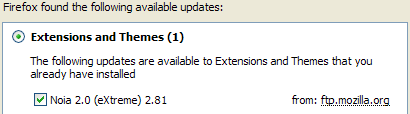 Adding to ease of use is Firefox's ability to download and install its own updates and updates for any extensions that you have installed.
 The setting that controls this is found in the Advanced Options dialog.
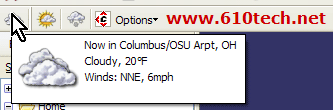 This is a small application that keeps information about current weather conditions and forecasts for the next 2 periods (today and tonight, for example) in icon form on the screen. It also pops up an hourly reminder of conditions and can be set to display information from any location that collects weather data.
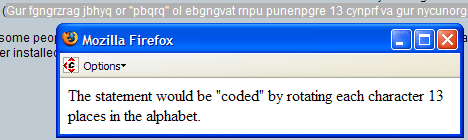 In the old days, when the Internet was more polite than it is today, someone who posted an opinion that might cause distress to those reading the comments would often ROT13 them.
 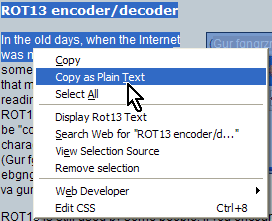 If you've ever copied text from a website and pasted it in to another application (Word, for example) only to have all of the formatting come along with it, one solution is installing the Copy Plain Text extension. It's easy enough to tell Word not to paste formatted text by default, but this extension is an easy way to make sure you get only plain text.
 Easy. Easy. Easy. Choose Tools, Extensions from the Firefox menu. This will open the display I showed earlier that lists all of the extensions you've installed. (If you haven't installed any yet, it will be blank, of course.) At the bottom of the display you'll see a link to Get More Extensions. Click that and Firefox will take you to the Mozilla website where the extensions are stored.
  NINE CATS: Firefox itself earns about 2 dozen cats. The extensions range from 7 to 10. Some (AdBlock) would be hard to live without, while others (themes and Forecast Fox) are just nice to have. Extensions such as the ROT13 encoder aren't particularly useful, but they're fun. So ... overall a 9.
  Google announced that their recently launched Google Mini search appliance has been reduced in cost, and at the same time they have increased the search capacity from 50,000 documents to 100,000 documents.

