
| Home • Previous page | Do you use a pop-up blocker? If so, please read this. |
March 27, 2005 |
WTVN Radio • Columbus, Ohio Sunday morning from 8 until 9 |
| Important disclaimer: | |
Another smart move from CorelFor several years, it appeared that one of my favorite software companies didn't have a clue and nobody would loan them one, even if they promised to give it back unused. Now, with several profitable quarters behind the company, and another key acquisition, the Ottawa company is back in the game. Corel had lost its way -- alienating Microsoft, chasing after applications developed in Java, and then looking for the golden ring in Linux. A change of leadership, acquisition by a venture capital company, and focusing on the company's core products has done wonders. Corel managed to confuse no small number of people when it acquired Jasc, the publisher of Paintshop Pro. Corel already had a pixel editing program (PhotoPaint). Two, actually, if you include Painter, which you shouldn't. Painter is a specialized application that we'll talk about in a few weeks. But PhotoPaint could be used to edit photographs, which is what Paintshop Pro does. So why acquire the Minnesota company? That's a reasonable question because, from the outside PhotoPaint and Paintshop Pro look similar. But despite the name, PhotoPaint has never had strong tools designed for editing photographs. I spoke with Corel's Mark Rathwel, who is a product manager and he says there's a lot of synergy between Paintshop Pro and Corel's existing applications ... As you can tell from the version number, Paintshop Pro has been around for a while. Jasc has always operated under a philosophy that's similar to Corel's -- the goal is has been to give customers the most powerful program possible at the lowest possible cost. It seems to be working. To illustrate some of the features, I've again called on our orange cat, Tangerine. It's tough being an orange cat -- the number of things one must sleep through is truly daunting. To see larger copies of the images below, just click them and they'll open in a new window.
Why doesn't Apple include this book with Ipods and Itunes?Kirk McElhearn is an American expatriate who lives in France. He's a Mac author and journalist; one of his recent books is Ipod and Itunes Garage. When he heard I was working on some Ipod stories, he offered to have his publicist send me a copy of the book. I never turn down review copies of books, and I'm particularly happy that I accepted this one.
Apple's attitude is that people should be able to figure out how things work. Because of that attitude, Apple software arrives with even worse documentation than Microsoft software. What annoyed me is that Apple doesn't include Kirk's book with every Ipod they ship. Ipods seem easy enough to use, but a few additional tips would allow users to get more out of the little white boxes. And although Steve Jobs still believes (incorrectly) that Itunes is the best Windows application ever written, it would be better with a few instructions. That's exactly what Ipod and Itunes Garage provides. And then some! Here are just two "killer" tips that I learned from reading the book.
The book is a series of dozens of short chapters in five sections. Because Itunes and the Ipod work together so closely, the book starts with a section on Itunes, then moves on to the Ipod, file sharing, additional software, and accessories.
TopicsThe dozen chapters cover buying music from the Itunes music store, your Itunes music library, the Ipod mini, managing and sorting playlists, Ipod games, troubleshooting your Ipod, the future of digital music and the recording industry, backing up your music files, linux and the Ipod, accessories, including headphones, car chargers, and cases, turning your Ipod into a total music system, and storing and transferring digital photos. Kirk is brutally honest in assessing the good points and the bad points of Itunes and the Ipod. One of the primary shortcomings of the Ipod is the battery life. This isn't a problem for me because I use my Ipod at the office most of the time and it's plugged in to a wall outlet. My younger daughter says her Ipod frequently runs out of power before she runs out of day. Adding extra battery power is cumbersome at best and replacing the battery in an Ipod is not a task for the squeamish -- or for those who want to maintain Apple's warranty. Kirk notes that things are improving. Today's Ipods generally give 8 to 12 hours of playback. Which format?Should you choose a "lossless" format for music? Or 320Kbps? Or 128Kbps? Or something else? Read this book and you'll get some real-world suggestions for choosing the format that's right for you and right for year ears. I already knew that my aging ears can't hear much difference between 128Kbps and Apple's lossless format, particularly considering that most of my listening is in a car or an office environment, so 128Kbps is all that I need. If my ears were 30 years younger and could still hear "ultrasonic" motion detectors, I might be wise to choose a more robust encoding format. In about 400 pages, Kirk McElhearn gives Ipod owners and those who use Itunes (whether they own an Ipod or not, whether they're using OS X or Windows) important tips about how to get the most out of the hardware and the software. Another useful feature – and one that more and more publishers are embracing is a website where Kirk provides information to update the book. Several weeks ago, I suggested The Rough Guide to Ipods as a book Ipod owners should own. I still feel that's a good book to have. It costs less than $10 and is small enough that you can carry it along wherever you take your Ipod. Kirk's book is much larger and covers more ground. At $25, it's exactly what you need if you're a serious Ipod user.
Chump stumpersSteve Dizek Sr: I cannot archive photo files to CDs using the Archive Wizard within DI 9 Library. Numerous attempts, after selecting each of the four options (Save all photos not previously saved, Save only the photos opened before entering Wizard, etc.) produce the same result--a totally frozen PC after hitting Next on the Wizard photo selection screen--even when trying to archive only one selected photo. Totally frozen means that my only option at that point is to re-boot the PC. Computer info: Dell dimension XPS T450MHz Pentium III MiniTower Base with 512K Cache; 512 MB, SDRAM memory; 13.6 GB Ultra ATA Hard Drive, 7200 RPM; Win 98SE; MSIE 6.0.2800.1106IC; Musicmatch Jukebox Plus v. 7.1; 4.8x DVD ROM drive;Yamaha XG 64V Wavetable sound;16MB Diamond Viper NVIDIA TNT AGB Graphics card. Space in C:\Windows\TEMP is > 9100 MB. CD mastering and duplication software: PrimoCD Plus, v. 2.0.753 DI 9 Library bundled with DI 9 Pro as DI 9 Suite, lists the following system requirements on the box: Multimedia PC with Pentium 700 MHz processor or higher; MS Windows 98 or higher; 256 MB of RAM; 400 MB of available hard disk space; MS IE 6.0 or higher; quad speed CD-ROM drive or higher; Super VGA monitor; 1 MB of Video RAM; a mouse or other suitable pointing device. I have defragged the hard drive, and performed normal housekeeping such as purging all .tmp and similar files. Have been told that my 450 MHz processor is OK vs. 700 MHz requirement, but that everything would run slower. Am I in a system requirements bind? Sayeth the Chump: Probably. A 450MHz P3 would be at the low end of the P3 systems. As I recall, the P3 eventually hit something a little over 1GHz (more than double the speed of your P3) before Intel introduced the P4. A P4 at the same clock speed as a P3 is substantially faster and clock speeds are now in in the 4GHz range, 10 times that of your machine (plus the multiplier from P3 to P4). The first Pentium 3 processor replaced the Pentium 2 and ran at 450 MHz. The Pentium 3 bus was first rated at 100 MHz but then increased to 133 MHz beginning with the 500 MHz model processor -- also known as the "500EB" model. I'm guessing that the computer is about 5 years old and about all you can expect out of machines is 3 years if your goal is to use high-end features. The bad news is that to do what you want to do and to do it successfully, you'll probably need a new computer. The good news is that it will probably cost less than $1000 for a machine that will do what you want it to. I'd recommend taking a look at Dell's current offerings, if you're a fan of Dell, or checking with www.TCR.com in Reynoldsburg. Kathleen in Marion, Ohio: My computer is an hp Pavilion mx70, with Windows XP Service Pack 2, with Pentium 4, 1.6 GHz and 120 MB of RAM. Its about 3 years old I think. My internet provider is Adelphia Cable. The service man that hooked me up said that my computer processor might not be able to keep up with the Adelphia service. Is this true? My computer locks up constantly, and I have to unplug it to get it to come out of it. The old ALT ctrl, delete doesn't even work. If I purchase a new computer, what should I look for in a processor so that this doesn't happen? I do a lot of selling on Ebay, and need it to work FASTER! I really dislike the Adelphia service, with all the pop ups even with a pop up blocker. I swear I didn't have as many when I was on dial-up! DSL unfortunately isn't available in our area. According to the Chump: A P4/1.6GHz with 128MB of RAM certainly isn't the fastest computer on the block, but it's faster than the Internet. In other words, the Adelphia Cable guy was misinformed. If you do a lot of image manipulation and spend a lot of time on the computer, then a faster system would be helpful. Time spent waiting on a computer is always annoying. If you have a pop-up blocker but you're still getting pop-ups, I would be inclined to suspect spyware/adware. Frequent crashes can also be a symptom of this kind of infestation. My recommendation would be to have the computer examined by a competent technician. It's likely that many of the problems can be eliminated. Once the machine is clean, make sure that all of the necessary protective measures are in place -- a firewall is essential these days (software at least, and preferably both hardware and software), antivirus, and anti-spyware. Raymond Jepsen of Columbus: I was recently using the new Microsoft AntiSpyware beta 1 (under Advanced > System Explorer > Applications > Running Processes) checking all running processes to be sure I know what they are and that they are supposed to be there. I ran across one called UstorSrv.exe located in the winnt\system32 folder. Question: What is purpose of UstorSrv.exe and what does it do? The Chump wimps out: It might be just about anything. Try right-clicking the file and reading the properties panels. That may provide a clue, although these can be forged. I found only a few references to the file and nothing was conclusive. It's a file that's present on a number of machines that have been hijacked, but so are thousands of other useful files. In other words, its presence in this case means nothing. Laura Chervenak of northwestern Ohio doesn't really want to stump anyone: I'd rather have a good answer for this! I'm the director of an online K-12 school called GOAL Digital Academy. I have a 'stable' of around 100 computers that are used in students' homes. As students withdraw and others enroll, I re-image the computers to re-issue. The problem comes in when the computer is coming from the home of a smoker. Even after cleaning out the dust and particles from the inside of the computer, the smell of smoke remains, and when the fan turns on, it actually pumps cigarette odor into the room. Any ideas? The Chump chewed on this one for more than a week, but didn't find a good answer: I wonder (now that it seems I won't find a magic-bullet answer) if you might take the hotel approach to the problem. Have 25% of the machines designated as "smoking" machines -- these would go to people who have a smoker in the house. The others would be reserved for non-smokers. If there is a charge for the computers, you should consider a higher fee for computers that are in a smoking environment because those machines will fail sooner than those not in such an environment. The problem is that smoke particles are tiny and sticky. Removing the odor would involve more than just pumping ozone in (although that might help). To get all of the smell out would require disassembling the computer and cleaning the individual parts. The primary source of the smell is probably the power supply. Possibly replacing that would largely solve the problem -- although at a cost of $30 or so for each machine that needed a new power supply. Greg Williams asks: How can I set Google as my default search setting in MS IE? I have tried to enter the Custom setting but they have a hard list of options and Google is not one of them. Any easy fix? The Chump finally nails one: The easiest option would be to download the Google toolbar, which is free. It also includes a pop-up blocker: http://toolbar.google.com/index_2 Karen Dowalter asks: How can you get older software to work with Windows XP? Have new computer and need to know how to get my stuff to work. Thanks for your help. The Chump says this question has a trick answer: Most applications will work with XP, but not all, so you'll need to approach it on a program-by-program basis. Applications that won't run are typically older DOS programs that make certain assumptions that were correct when it was the only application running on the computer. These applications assumed that they could write directly to memory, that could write directly to video memory, and that they "owned" the keyboard. Those assumptions are no longer true and, when Windows sees an application trying to use something that's not allocated to it, the operating system kills the process. Applications that act in this manner are often games. Windows will not allow them to run. Most DOS applications will run properly (although you may need to create a specialized command window for them). Most older Windows applications will run (anything that was designed for Windows 95 or later should run). A few applications designed for Windows 3.x may have problems because that version of Windows just sat atop DOS. Nerdly NewsAnother Firefox security updateThis week the Mozilla Foundation released version 1.0.2 of Firefox to patch three vulnerabilities. Most people heard about the update before the heard about the vulnerability. Symantec gave Mozilla high marks for speed, saying that the company fixes vulnerabilities far faster than Microsoft does, but Symantec also said that Firefox currently has 21 security problems while Microsoft's Internet Explorer has just 13. One oddity that I noticed in obtaining the updates was that the Windows version's updater found the new version and installed it while the Mac version claimed no updates were available. With my Macs, I had to know about the problem, go to Mozilla's website, manually download the updated files, and install them. The patch fixes 3 flaws, including one inherited from Netscape in processing GIF images. Late last month, Mozilla released version 1.0.1 to patch 17 vulnerabilities. Symantec said Microsoft has done a good job recently in identifying and repairing security problems. As for Mozilla, the increase in vulnerabilities is related to the increased popularity of the application. Some may note that this is essentially the same statement I have made about Macs and their current lack of vulnerabilities. Disregarding the number of vulnerabilities and looking at the severity of the threats posed, Internet Explorer is still the more seriously flawed application. If you're running an un-patched version of Internet Explorer, your machine has more than 300 known vulnerabilities, some of them extremely critical. Spam for the spammersIBM is offering a technology they're calling Fair Use of Unsolicited Commercial Email (FairUCE) that promises to send spam back to the sending machine. The company is making it available for free and says there's no plan to make it a commercial product. FairUCE verifies the IP address of a message sender and matches it against a list of blacklisted domain names. If it finds a match, the system returns the message. IP addresses uniquely identify machines, so FairUCE can determine whether a message has come from a zombied computer, a spambot, or legitimate e-mail server. Instead of examining the content of the message to determine which messages are good and which are not, FairUCE returns messages that travel under false identities. IBM says its technology will reduce phishing and spoofing threats that are attempts to steal the receiver's identity. Let us know what you think. Write to:
|
 |
Have a question? Ask it and you might pick up a prize for stumping the chump. Send your question to . And ... good luck! |
Privacy Guarantee:I HATE SPAM and will not sell, rent, loan, auction, trade, or do anything else with your e-mail address. Period. |
Is this information useful? |
|

Joe(Photo by Sally) |

Bill(Photo by Scampi) |
|
As if you didn't already get enough weather on the radio! This is the only ad you'll ever see on this site. It's for my website host, BlueHost in Orem, Utah. Over the past several years, they have proven to be honest, reliable, and progressive. If you need to host a website, please click the banner below to see what BlueHost has to offer. Annoying legal disclaimer [an error occurred while processing this directive] |
||











 SEVEN CATS: Paintshop Pro has always been a solid application and adding it to Corel's stable of graphics applications should give it somewhat longer legs. This is the application that can do for digital photographs what PhotoPaint was never designed to do.
 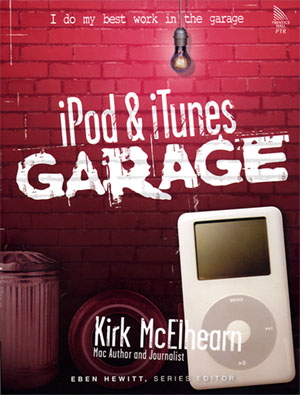 Actually, I found myself becoming annoyed as I read the book. Why? Because this is the book Apple should include with every Ipod it sells.
  NINE CATS: If you own an Ipod or use Itunes, buy this book. Don't think twice; it's all right. It's an easy, enjoyable read that packs useful tips, hints, and tricks on every page.

