WTVN Radio • Columbus, Ohio • Sunday morning from 8 until 9
Who's in the corner?
Is this information useful? If so, consider
making a contribution, please.

|
|
WTVN Radio • Columbus, Ohio • Sunday morning from 8 until 9 |
|
| Home
• Previous
page Who's in the corner? |
Is this information useful? If so, consider |
|
| |
December 12, 2004 |
Random thought:
|
 |
|
Using e-mail for marketingNo, we're not talking about spam here. There are legitimate uses for commercial e-mail. The weekly Technology Corner update is "commercial e-mail" but it's sent only to people who have requested it. High Impact E-Mail Professional makes it possible for anyone to send eye catching messages. When I started using High Impact E-Mail Professional to send the Technology Corner summaries a couple of weeks ago, the responses were interesting. About 80% of those who had strong enough feelings that they wanted to comment on the new format liked it. People seem generally more likely to respond when they don't like something, so the true like/dislike breakdown is probably greater than 80/20.
Every response from those who didn't like it said, in one way or another, "I don't like HTML e-mail" without specifying what's wrong with HTML e-mail. I used to be an anti-HTML e-mail person myself because the original HTML spec didn't provide for HTML e-mail. That may be because HTML hadn't been invented yet. Early e-mail programs didn't handle HTML very well, either. Most do now. Those who say HTML e-mail is wrong because the original spec didn't provide for it might be compared to people who say that power steering or power brakes are wrong because the original Model-T didn't have them. And I say that as one who opposed HTML e-mail for several years. If I have to choose, I'll choose "easier to read" and "clearer" over "I don't like it just because I don't like it" every time. Making something easy to read and clear is my goal. If there was ever a battle here, it's been "lost" by the proponents of "pure" plain-text e-mail. Yes, HTML e-mail is larger than plain text e-mail, but more than 50% of Internet users in the United States now have broadband access. Yes, HTML is not part of the original e-mail spec, but the e-mail applications used by more than 95% of e-mail users support HTML formatting. How it worksThe application comes with lots of templates and you can create your own, as I did for Technology Corner (but I used one of their templates as a starting point.) You'll need to store any images you want to use on their server. There are at least two reasons why this is the best way to send HTML e-mail that has graphics.
In addition to the $100 professional version, there's a $50 standard version that includes fewer templates and doesn't include features such as mail merge and personalization within the messages. High Impact E-mail is easy to use and, when you're ready to send a message, it opens Outlook, Outlook Express, or ACT (those are the only supported e-mail clients). The only problems I've encountered involve formatting. When I delete text and type new text, sometimes it's in the wrong format. The easy workaround is to select all the text to be deleted except the first and last characters, type the new text, and then delete the first and last characters.
Look at all the camerasFilm is dead and has been for several years, but some folks don't want to accept that fact. Kodak, Fuji, Agfa, and the other film manufacturers will continue making film for the foreseeable future, but eventually film will have the same importance as glass plates have today in the photographic world -- used mainly by students and artists who want to experiment with old methods. That's not to say that digital photography is perfect. The cameras are still too expensive, although you'll make up that cost in not having to buy or develop film. The files, if you want a high-quality enlargement, are still huge, but disk drives are inexpensive. A digital camera doesn't act like a film camera (unless you're used to shooting slide film), but learning the new techniques is something the average person can master in a day or two -- particularly considering digital's immediate feedback. The main problem with digital photography turns out to be a human failing: Backup. Once you've downloaded the images to your computer, they're still not safe. Creating additional copies on CDs is a good idea and high-quality CDs should last 50 years or more, assuming there are still CD readers 50 years from now. If you think this is a silly concern, see if you can find an 8-track music player, a disk reader for 8-inch floppy disks, or a working quarter-inch stereo reel-to-reel tape deck. The media often lasts longer than the technology. But let's assume there will be a way for your great-great-grandchildren to read these CDs and DVDs we're using to store photos because there probably will be and the images will be able to be transferred to the media that's current in 2054. What will they find? Thousands of files with names like "DSC_2315.JPG". The EXIF data that's embedded in the file will tell them all about the photo technically:
But we're supposed to be looking at camerasIf you've decided that this is the year to go digital, you've picked a good year. If you want to spend $100 for a digital camera, you can. Don't expect to get a lot, but it will be a digital camera. If you want to spend $6,000, you can do that, too. And if you'd like to spend $40,000 on a digital camera ... yep, you can do that. Economy camerasThe low end is in the $100 to $300 range. Theses cameras will be 2 megapixel to 4 megapixel models. Few, if any will have optical zoom and “digital zoom” is a lie. All of these cameras will be “rangefinder” view models, meaning that you don't look through the lens that will take the picture. They will be slow to operate, offer few additional features, and come with a 16MB or smaller storage card. Examples:
Advanced camerasFor $300 to $600, you'll get a 4 megapixel to 6 megapixel camera with 3x to 5x optical zoom. Some Olympus cameras offer 10x optical zoom. These cameras will operate a bit faster and will offer options such as the ability to record short videos. They often offer various flash modes and focus modes, Expect a 16MB storage card. Examples:
“Prosumer” camerasThese are cameras that appeal to advanced amateurs and pros who are on a budget. Expect to pay $600 to $1500 for a 5 megapixel to 8 megapixel camera with 3x to 5x optical zoom (some 10x). These will be SLR-like cameras, meaning you will look through the lens that takes the picture. Some will have removable lenses. Expect an external flash connection that's capable of working with studio flash units, full manual and automatic focus, a 32MB storage card. These cameras will operate quickly and will have little or no “digital delay”. Examples:
Professional camerasThere is some overlap with the prosumer models. These are cameras in the $1000 to $4500 range and will be in the same 5 megapixel to 8 megapixel range as the prosumer models, although some give preference to additional color depth over pixels. A few will have 3x optical zoom; most will come without a lens. These will be SLR cameras with removable lenses, external flash connections, manual and automatic flash, and manual and automatic focus. They probably will not include a storage card. The camera will have a buffer for rapid shooting and there will be no delay when you press the shutter release. Examples:
Don’t even ask what these costWell, go ahead. Digital backs cost $10,000 to $16,000 (plus camera) and make images that are typically in the 14 megapixel to 16 megapixel range. You'll spend another $10,000 to $30,000 to buy the camera that the digital back attaches to. Some of these are fast (several images per second) and others are slow (one image every 30 seconds). There will be no storage card, but there probably will be a firewire cable to connect the digital back to your computer. Examples:
Prices provided by B&H Photo and Video (NYC). Information on your disk driveNormally, when I mention disk drives, it's as part of a reminder of the importance of backing up the drive so that you don't lose the information in the event of a problem. But what if you don't want the data and you don't want anyone else to have it, either? A listener asked: Is everything, and I do mean everything, stored on the hard drive forever? I've been afraid to start a journal on my computer for fear that someday, someone might pick up my drive out of a trash can and read absolutely everything I've ever done. I know that there are erasers for your files, delete cookies, and track erasers, and even after wiping the hard drive clean, can't experts go back and look for stuff (as in the case of criminals, where they've found incriminating evidence on the computers used by them)? Great question! It looks at data from the other side -- secure destruction. The information is stored on the drive until the drive breaks or until you delete it. If the drive breaks, data might still be recoverable. There are data salvage companies that specialize in getting information back from failed disks that people didn't back up. If you delete the file, it's not really gone. The operating system marks the file as deleted, so that it no longer shows up in the directory. But all the information is still there. Getting it back is quite easy. There are utility programs that provide a secure erase function. These mark the file as deleted and then write over the data on the disk once or several times with various patterns of data. Imagine writing a phone number on a piece of paper and then scribbling over it with several pens held at various angles. Now it's difficult to get the data back, but not impossible. When the military removes disk drives with sensitive data from service, the disk is physically destroyed. For most of us, one of the secure erase utilities is sufficient. Example: Executive Software's Diskkeeper. Oh, and after you've removed the data from the disk (or destroyed the disk) it's still on your backup tape, backup CD, backup DVD, or any other media you've used for secure retention. In some cases, people have been tripped up by data that's on a backup device or a network server. Nerdly NewsBuying wine on the InternetIf you move from California to Ohio and you'd like to serve your favorite wine from a small vineyard near Napa, but that vineyard doesn't have a distributor in Ohio, tough luck! The Internet makes it possible for small wineries to sell direct to customers, but many states have laws that make it illegal. The Supreme Court is considering the case. Laws prohibiting such sales are unconstitutional and should be upended, lawyers for a coalition of winemakers and consumers told the high court's justices. The case concerns laws in only two states, Michigan and New York, where laws allow in-state wineries to ship wine to residents but bar shipments from wineries outside the state. Depending on how the Supreme Court rules, this battle could have a huge impact on how alcoholic beverages are sold in the US. The court will be considering the 21st Amendment, which turns over to states the regulation of alcohol sales and how that works with federal regulations that prohibits states from restricting interstate commerce or discriminating against out-of-state businesses. Goodbye IBM PCA couple of decades ago, IBM sold its Selectric typewriter division and jumped in to the growing PC market. Now the company has sold a major stake in its PC business to a manufacturer in China. Some in the industry are comparing this to RCA's decision to stop making televisions. RCA more or less invented television, but sold the business to France's Thompson company. IBM didn't exactly invent the personal computer, but IBM's entry into the market made it possible for business owners to justify buying the devices. What's next? Imagine this: Hewlett Packard could get out of the PC business within a few years. What about Dell? Dell has the notebook market, but low margins on desktop machines could mean that even Dell gets out of that part of the business. China's Lenovo is paying a lot of money for a business unit that's not making any money, but IBM's built-in-China computers will have a price advantage. Oh, and by the way -- Apple's Powerbooks are built in China, too. If you look at Europe, the top selling computer brand is not a US brand. It's Acer. Acer is an Italian company. Let us know what you think about this program! Write to: |
|||||||||||||
|
|
Privacy Guarantee:I HATE SPAM and will not sell, rent, loan, auction, trade, or do anything else with your e-mail address. Period.
|
|
This is the only ad you'll ever see on this site. It's for my website host, BlueHost in Orem, Utah. Over the past several years, they have proven to be honest, reliable, and progressive. If you need to host a website, please click the banner below to see what BlueHost has to offer. As if you didn't already get enough weather on the radio! Annoying legal disclaimer
[an error occurred while processing this directive] |
|||




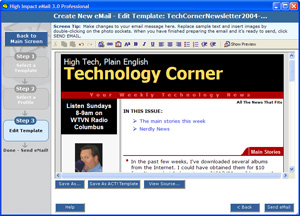 If you don't like HTML e-mail, I can sympathize. I, too, one felt that e-mail should be plain text. I don't have that feeling today because the vast majority of e-mail programs understand how to deal with HTML e-mail. And using HTML e-mail allows me to format the message so that it's more readable. That, in fact, is the feedback I received from those who liked the new format -- it's easier to read, easier to follow, clearer. That's the whole point of communication, isn't it?