
WTVN Radio • Columbus, Ohio • Sunday morning from 8 until 9
Who's in the corner?
Is this information useful? If so, consider
making a contribution, please.

|
|
WTVN Radio • Columbus, Ohio • Sunday morning from 8 until 9 |
|
| Home
• Previous
page Who's in the corner? |
Is this information useful? If so, consider |
|
| |
September 12, 2004 |
Random thought:
|
 |
|
Office 2004 redecorates your Mac's Microsoft OfficeNormally when I talk about one of the office suite applications, I start with the word processor function. While I consider the word processor function to be the most important part of the application, this time I’m not starting with the word processor (Word, in this case) and the office suite is on the Mac under OS X.
But I was planning to talk about what would be "Outlook" on a Windows machine. Here it's called “Microsoft Entourage 11.0”. Although Outlook has not been on my short list of most-loved programs (or even my long list – ever) Entourage is an impressive piece of work. Side note: On the Windows side, I use Outlook for my calendar, contact list, and task list. I do not use it for e-mail. It’s not that I don’t like Outlook, it’s just that Microsoft has a history of adding features to improve the usability of its applications that are also easily used by creeps who want to do harm to your computer. On the Mac side, the e-mail options are limited. Apple provides “Mail” for free with its operating system, but this is hardly a heavy duty mail application. Far too many people have lost far too much mail to Mail crashes for me to consider it. Qualcomm’s Eudora is functional, but not exactly up to date. Opera has an e-mail client. Mozilla has an e-mail client and the Mozilla project is working on Thunderbird. But if you’re a Mac user, Entourage is definitely worth your consideration. Because Entourage is the Outlook of the Mac, it’s more than just e-mail. This version introduces the Project Center, which links contacts, appointments, tasks, and e-mail. Once you’ve created a project with Entourage, you can “connect” to it from PowerPoint, Word, or Excel. E-mail is one of Entourage’s main functions and the Mac Business Unit has done a good job here. If the Mac was my primary machine, I would probably use Entourage for e-mail even though I would miss the functionality provided by The Bat under Windows. Entourage includes protection against spam and worse. By default, the protection feature is set to “low”, meaning spam will get through. Users can modify the settings and teach Entourage to kill most spam and to let most good messages get through. Entourage supports encryption and digital signatures. Encryption keeps the casual observer from viewing your message. Digital IDs verify that the person who claims to have sent a message is the actual sender. OK … now on to WordA new feature in Word (and the other applications) is called the “Compatibility Report”. This is a feature that would be a good addition to the Windows version, too. It’s a test that help the user to determine whether the document will appear as expected when it’s opened on another computer. The report identifies and helps the user fix conditions that might cause the document to display or print incorrectly in earlier program versions or in Windows versions of the software. Another welcome new feature is “Save as Picture” because people insist on using Word to send pictures and other images. There are probably worse ways to send pictures to somebody, but I can’t think of one. Now if users of Office 2004 on the Mac receive an Office document with graphics they want to use in another document, they can save the graphic in an appropriate file format and use it in other documents. Word adds a new “Notebook layout” view that’s the electronic equivalent of a notebook. It’s designed for users to organize and search notes, mark notes for additional activity, assign tasks, and attach other files related to the project.
Of particular note are a couple of what Microsoft calls “Smart Buttons”. The first is an AutoCorrect options button that changes how Word handles automatic corrections. More important to me is the Paste options button. I generally recommend to people that the use the Options/Preferences setting on word to change Paste (Ctrl/Cmd-V) from “Paste” to “Paste Special” to control how pasted items are treated. The new button allows the user to change this on the fly. Taking a cue from publication programs such as Adobe InDesign, Word’s reworked Document Map gives users new and better ways to move through long documents. Thumbnail images of pages make finding what you’re looking for particularly easy. The Mac is ahead of Windows PCs on handling Unicode typefaces and Office 2004 provides improved Unicode support, meaning the multi-lingual user can easily move between Roman and non-Roman alphabets. (This is probably of use to approximately 0.0000001% of the US population, but may be of some use in literate parts of the planet.) The entire suite offers improvements in graphics. One example: Soft shadows that appear more realistic. The user can change the shadow’s color, transparency, degree of softness, angle of light, and degree of blend with the background. Apple users are no longer required to learn Visual Basic for Applications (VBA) if they want to script something. Office 2004 now supports AppleScript natively. For those who learn by tearing an existing document apart to figure out how something was done, Office 2004 comes with a set of sample documents that show some of the new features and explain how to use those features. A spreadsheet that ExcelsExcel introduces page layout view, which is a more powerful version of the print preview function that’s been part of the application for quite some time. Users can see the page exactly as it will print (that’s nothing new) but they can also make changes in layout view (and that is new).
Pointing with Power
Previously, the Mac version of PowerPoint had problems displaying animations that were created in the Windows version. That’s been fixed (as long as the Windows user created the effect with PowerPoint 2003 or later.) MSN Messenger works well with Entourage, and there are features that might interest people who haven’t previously used the application. If you’re part of a group that’s working on a Word document and Track Changes is on, you can send an instant message from the Track Changes dialog. Further commentaryAfter writing this review, I thought I should look at what some of the Mac pundits have said about it. MacAddict headlines its article "Mo' Better, Mo' Bloated Productivity Suite" apparently because the editors can't bear to praise Microsoft without taking a swipe at the company. One person's"bloat" is another person's "feature", guys. The review concludes that the suite is "Great" and gives it a Mac Addict Editors' Choice button. So it's "bloated" but "great". Do these guys have a clue? Macworld, which I consider to be a more balanced publication, gives Office 2004 overall high marks, "The new suite wide features of Office 2004 help tie its programs together into a true suite. You may just find that these features offer you a productivity boost as well" and calls it a "worthy upgrade." Disappointments?Yeah, a few. Chief among the is the lack of a database application such as Access on the Windows side. Maybe the Mac doesn't need another database application because it already has FileMaker Pro, but it would still be nice to have a database program here. The Professional version comes with an application Windows users don't need: Virtual PC, the application Microsoft acquired from Connectix about a year ago. This is the application that allows Mac users to run Windows software in a virtual Windows PC under OS X. So that eliminates some of the disappointment about not having Access. If you really need Access, get the Pro version of Office 2004 for the Mac and buy a copy of Access. Another disappointment, and this is a big one, is that there’s apparently no way to share contacts, calendars, and to-do lists with yourself if you have a Mac running Office and a Windows machine running office. The only option I could find involved setting up an Exchange server, storing all my data on the server, and then connecting both machines to the server. It’s so easy on a Windows machine. All I need to do is copy the Outlook files to a USB solid-state disk, carry that to the office, and overwrite my copy of the file on the office machine. It’s an absolute mystery to me why Microsoft didn’t provide a way to copy data files from Windows to Mac or from Mac to Windows. I’m not talking about full synchronization. I understand the perils involved there. All I’d like is to be able to use my home machine as the master, the machine with which I sync the Palm device, and then have the ability to copy or import the data files to a Windows machine at the office and to my Mac Powerbook. The most I could figure out how to do is copy my contacts from the Windows machine to the Mac. I also encountered a problem with the Office Assistant. Unlike a lot of users, I rather like the assistant. When I have a question, the assistant usually finds the answer. But on Windows, I don’t like the paper clip. Instead, I use a cat. On the Mac, I don’t much care for Max (“the box with legs”). I’d much rather have a cat, but when I tried to choose a new assistant, there were no other options. The Back and Next buttons were grayed, so I searched the CD for assistants – none found. I tried the Mac-centric part of Microsoft’s website – nothing. The on-line knowledgebase – nope. I even asked Max. Everything seemed to suggest that I should be able to trade Max in for something else, but even re-installing the application didn’t fix the problem.
I thought my problem would be resolved before this show aired, but I've heard nothing as of late on Friday (10th) when I generally finalize the week's show. This isn't a serious shortcoming and I imagine that the problem will eventually be resolved. Additionally, I'm assuming that the problem is the result of something I did to set up Office on the Mac and that I'll eventually replace Max with a cat. Still, it would be nice to get a prompt response from Microsoft support when I present (med-speak) as a regular user.
For more information, see the Microsoft Office Mac website. The death of a PDAI've talked occasionally about the Sprint Treo 600 that I carry around with me. It's a phone and it's a Palm organizer. This is a great combination because I don't have to carry both an organizer and a phone. But when one breaks, the other breaks. That's what happened on one Tuesday in August. The phone had been acting a little odd -- losing a connection when I was within sight of a cell tower, for example. My older daughter called; caller ID told me who it was, but I couldn't hear her. She called again. Same thing. I called her and, with signal strength at full scale, the phone showed "No Service". I was less than a minute from where she was, so I just drove there. Later, testing the phone, I called the office. Three calls in a row -- no problem. Then two disconnects with a "No Service" message while the signal indicator was full scale. During my next attempt, the phone displayed a blue screen with a yellow horizontal line. No buttons worked. I pushed them all. In various combinations and permutations. Then I pushed the reset button and the phone was dead. So dead that even plugging it in to the power supply produced no response. So I took the phone to the Sprint office. Mine was the second Treo 600 being swapped out that day at that office. I went home with a brand new phone that contained no data. I have a lot of data on my phone. Vindigo has information for New York, Seattle, San Diego, and a couple of other cities that I occasionally visit. My calendar has appointments several years into the future. The contact list contains several hundred entries in half a dozen categories. The user IDs and passwords for every client's server are encrypted on the phone. There are several data files with lists of things that are useful for me to appear to know. An address finder and subway listing for New York City. A dozen or so Word and Excel documents. Within about 3 hours, all of the information was back on the phone. I probably could have accomplished the task a little sooner, but I'd been thinking about changing the primary sync device from a notebook computer to a desktop computer. The desktop system is on every day and I can synch the two devices every day; the notebook computer isn't on every day. At the same time, I decided to upgrade several of the applications to the current version. That meant installing the basic Palm software on the desktop system, then downloading and installing all of the new versions of the various programs I use. Then copying the data files from the notebook system to the desktop system. After about 30 synch operations, I had all of the essential applications back and most of the data. Most of the data?No backup system is perfect and when you're dealing with a mobile device, you're almost guaranteed that any malfunction will cause some data to be lost unless you choose to make all changes on the desktop system and use the mobile device as nothing more than a mirror. The day the Treo died (not to be confused with The Day the Music Died) I had entered a lunch appointment with a friend and several holidays. It wasn't hard to fix this problem: I like the guy I'm having lunch with and the place we're having lunch, so I would have remembered the appointment even if my phone didn't beep at me. But it will now beep at me because I re-entered the information on the desktop and then synched the two devices. It was also easy to, with a quick glance at the calendar, to enter holiday information for Thanksgiving, Christmas, and New Year's. What's the point?Again it's the importance of backup. I'm fairly conscientious about synchronizing the phone with a computer several times a week. Synchronizing with a notebook system that isn't regularly backed up could be a problem, though. And when I travel, both the notebook and the phone are with me. This is the kind of single-point failure that should be avoided. When I'm at home, the phone and the computer are both present, but there's a backup device at the office that contains the data. When I'm at the office, the phone and the backup device are present, but the computer is at home. If both my home and my office are vaporized, I'll probably have more pressing problems than the missing information that was on my phone and my computer and a backup device. This isn't milspec security, but it's adequate for my needs. The phone/PDA in your pocket may be worth several hundred dollars, but the data on it is worth a lot more. Are you protecting the data? Nerdly News
|
||||||
|
|
Privacy Guarantee:I HATE SPAM and will not sell, rent, loan, auction, trade, or do anything else with your e-mail address. Period.
|
This is the only ad you'll ever see on this site. It's for my website host, BlueHost in Orem, Utah. Over the past several years, they have proven to be honest, reliable, and progressive. If you need to host a website, please click the banner below to see what BlueHost has to offer. As if you didn't already get enough weather on the radio! Annoying legal disclaimer
[an error occurred while processing this directive] |
||
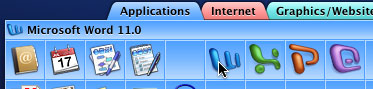 I’ve never visited Microsoft’s Macintosh Business Unit, but I suspect it's an exciting place to work. The Mac still has a paltry market share outside of the graphics industry, but Microsoft has several reasons for wanting to play in Apple’s sandbox. Although the Macintosh Business Unit is in based in Redmond, about 40% of its employees are in Mountain View, California. The division is apparently given the autonomy to develop applications even if they aren’t exactly in the Windows mold.
 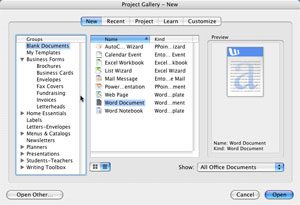 Remember Microsoft Works? When you open the 2004 version of Microsoft Office for the Mac, the first screen is reminiscent of MS Works. That's not a criticism. Microsoft Works isn't a particularly stellar application, but it handles the basic, it's cheap, and the application had some good ideas. This is one of them and it's a welcome addition to the suite.
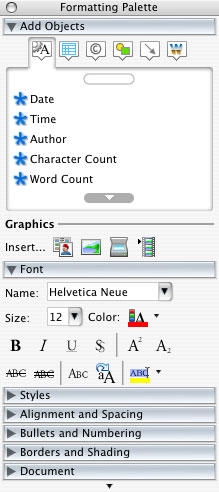 Word's reference tools now go beyond the ubiquitous dictionary and thesaurus by adding the Encarta Encyclopedia and MSN Internet search. This version also has a powerful palette (at right) for formatting, inserting objects (some of which I still haven't been able to figure out how to use), special characters, colors, bullets, and a lot more.
 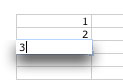 Charting and auto-fill have also both been improved, along with formula editing. When the user edits a formula now, the cells referred to in the formula are color coded. And when you're entering information in a cell, the cell is highlighted and shadowed. With all that emphasis, it's hard to lose track of where you are.
 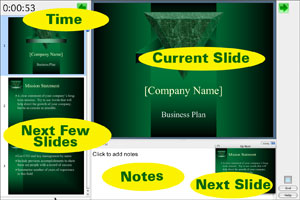 PowerPoint comes with some new presenter tools to help users better pace and deliver slide shows. You have the option of displaying an on-screen clock that the audience doesn’t see. In addition, the presenter can see the current slide and the next few slides. If you’re sufficiently adept, you can even make changes to the presentation without appearing to fumble.
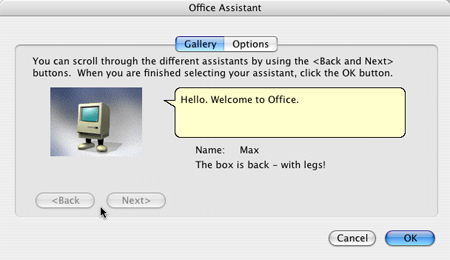 Eventually, and with some embarrassment, I filled out a trouble report with Microsoft support. The first suggestion involved deleting preference files and folders where settings are stored. No change. Microsoft's support asked me to try several things and, when nothing worked, wanted proof that I couldn't see any options other than Max, so I provided a screen capture (at left).
 New Macs, bad press


