
WTVN Radio • Columbus, Ohio • Sunday morning from 8 until 9
Who's in the corner?
Is this information useful? If so, consider
making a contribution, please.

|
|
WTVN Radio • Columbus, Ohio • Sunday morning from 8 until 9 |
|
| Home
• Previous
page Who's in the corner? |
Is this information useful? If so, consider |
|
| |
August 8, 2004 |
Random thought:
|
 |
|
Crazy like a FoxmailNo, not "Crazy like a male fox." This is about an e-mail program from the People's Republic of China. At the moment the program is free -- all you have to do is download it -- and despite some rough edges, it has some promise.
There's also the question of whether HTML mail is good or bad. Purists will tell you that e-mail should remain true to its heritage and include nothing but plain text. I agree with these folks for mailing lists and the like, but we part company when it comes to individual personal messages. If you want to send HTML mail with lots of colorful typefaces and images to someone who doesn't mind receiving a message with all that baggage, who am I to complain? And so once again I manage to come down on all sides of an issue.
If you understand how HTML works and you don't mind experimenting, you can create your own template (or "tamplate" as the help file occasionally spells it) -- you won't get any help from the help file, though. I knew that the template files had to be stored somewhere, so I went looking for them. When I found them, I opened a couple of them to see how they work. They're mainly just plain HTML with some special variable names tossed in. Foxmail's developers clearly speak English as a somewhat distant second language, but they do manage to communicate (more or less):
Who might want Foxmail?
For more information, visit the Foxmail website and choose "English". Windows XP service pack? No, thanks.Microsoft will soon release "service pack 2" for Windows XP. I'll download it and install it, but not right away. Many of the features SP2 adds are already in place on my computer and there's about a 100% chance that installing SP2 will break some of the applications I use every day. The enhancements will fix some problems with XP, but I'm not willing to deal with the inconveniences the service pack will bring. Not yet, anyway. This is an expensive update for Microsoft -- $1 billion or so -- but much of the work done on the XP upgrade will have implications for later versions of Windows. There's no charge for the service pack because Microsoft considers it to be mandatory. When? Microsoft could release SP2 this weekend or next month. There's no confirmation of any date, other than "any day now." Prudence and caution suggest that it would be wise to wait at least several week to install it, SP2 includes a real firewall (a first for Windows) and several other new features that are specifically designed to enhance security. Microsoft delayed release of the service pack to work on compatibility issues. The goal is to have SP2 not break any existing applications, but I'd prefer not to be the guinea pig. Those who install SP2 during the first few weeks it's available will find and report the problems. Microsoft will fix the problems, then I'll consider downloading it. The download will be a big one -- around 80MB. Mac, Windows, or Linux?I keep hearing about why the average computer user should become a Linux user and I keep looking at Linux. But at the end of the day* I continue to use a computer that's based on Windows or the Mac operating system. Why? It's been an easy decision for me so far and it's a decision I can easily summarize in a series of bullet points.
I don't consider Linux to be suitable for me, but if your goals involve browsing the Web, composing and editing your own word processor files and spreadsheets, and not much else, Linux may be right for you. Or if you want to run a website hosting machine, Linux will be right for you. This is one area where Linux far exceeds Windows. The Technology Corner website runs on a Linux server and Linux is a fine choice for that. Just don't expect to see it on my desktop anytime soon. *"At the end of the day" is currently the most in and trendy political-speak term, so I felt that it was essential to use it at least once. If I can control myself, that's the last time I'll use it. Nerdly NewsDigital InsecurityA couple of years ago, antivirus companies began thinking about how viruses would affect handheld computers -- Palm devices and Pocket PCs. We're beginning to see the first wave of attack files now. The threat isn't great yet. Backdoor.Bardor.A (also known as WinCE.Brador.a) is a Trojan application that lets an attacker gain control of the handheld, but that's where it stops -- so far. They can't propagate by themselves and must be sent as an e-mail attachment. The Trojans use "interesting" file names to fool people into opening them. So far, the problem is limited to devices that use ARM processors and run Microsoft's Pocket PC operating systems. A Pain in the BluetoothBluetooth is the technology that allows devices to communicate with each other without wires. Some organizers use Bluetooth to communicate with computers. Phones use Bluetooth to connect external devices such as headsets. But there's a security problem that can allow an attacker to download information from a victim's Bluetooth device. This means your address books, calendar, and text messages may not be secure. For a lot of us, that's no big deal. But what if you're the president of a company? The problem isn't limited to just reading. The attacker can write a fictitious text message to the device or even turn it on so that it acts like a bug and sends everything you say to someone sitting across the room. Or in another room. Phone companies say the risk is small, but a couple of security professionals demonstrated the problem recently in Las Vegas. Bluetooth is supposed to work with devices up to about 30 feet, but devices can be created to dramatically extend that range. Let us know what you think about this program! Write to: |
||||||
|
|
Privacy Guarantee:I HATE SPAM and will not sell, rent, loan, auction, trade, or do anything else with your e-mail address. Period.
|
This is the only ad you'll ever see on this site. It's for my website host, BlueHost in Orem, Utah. Over the past several years, they have proven to be honest, reliable, and progressive. If you need to host a website, please click the banner below to see what BlueHost has to offer. As if you didn't already get enough weather on the radio! Annoying legal disclaimer
[an error occurred while processing this directive] |
||
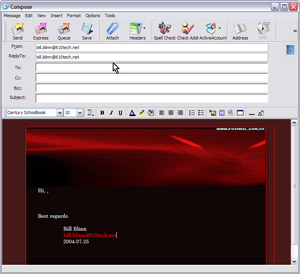 The current version of Foxmail is 5.0.600.0, so it's been around for a while. I'm not sure when the first English version became available, but I do know that version 4 was available as an English download. Foxmail's primary difference is its ability to create good HTML mail, so it's a popular program among the spammer community.
 Foxmail looks a little like Eudora, a little like Outlook, a little like The Bat, and probably a little like some other e-mail program I've never seen. It comes with several HTML templates that range from not too bad to downright ugly, but you can create your own. Maybe.
  Well, it's free so the cheap crowd should be lining up. Eudora is free, too, but only if you allow the application to show ads to you. The Bat is free, but only for 30 days. Outlook (Lookout!) Express (Depress)? Sorry. Eudora doesn't do as good a job with HTML mail. The Bat does HTML mail, but not well. Outlook (Lookout!) Express (Depress) does HTML mail, but only at the risk of your computer's security. If you're a fan of "pretty" HTML mail and you don't mind tinkering with the program to figure out how it works, Foxmail might be just what you're looking for.



