
WTVN Radio • Columbus, Ohio • Sunday morning from 8 until 9
Who's in the corner?
Is this information useful? If so, consider
making a contribution, please.

|
|
WTVN Radio • Columbus, Ohio • Sunday morning from 8 until 9 |
|
| Home
• Previous
page Who's in the corner? |
Is this information useful? If so, consider |
|
| |
Sunday, May 2, 2004 |
Random thought:
|
 |
|
Setting standards for HTMLIn the beginning, there was HTML and it was simple. The markings were designed to specify document organization (headings, text, terms, definitions, and the like). Then came Netscape and (later) Microsoft. They wanted to add graphics and colors and the result was the use of HTML to provide formatting, a job for which it was not intended. The ensuing mess produced a series of non-standard "standards". Eventually the World Wide Web Consortium (W3C) convinced developers of the need for true standards. Once again HTML is supposed to be used to indicate document organization and appearance is to be controlled by "style sheets". Now the only problem is how we implement the standards. The answer is HTML validation, preferably validation with an eye to the future. The next phase of HTML development is XHTML, which you can think of as HTML with strictly enforced standards. The wise developer will already have started writing code that complies with the new standards even though browsers continue to display badly coded HTML without complaining too much. Create a table that's missing a few "closing tags" and the table will still display properly in some browsers, but it will cause others to crash. Paragraphs must begin with a paragraph tag, but the current HTML spec doesn't require a closing tag. When the browser encounters the next opening tag (for another paragraph, a heading, or other "sectional" component, it assumes the previous tag should be closed. In most cases, browsers can deal with mismatched tags. Tags are supposed to be nested. For example <BOLD><ITALIC>Text goes here</ITALIC></BOLD> would be correct tags. (These are not real HTML tags; I am using them only for illustration.) <BOLD><ITALIC>Text goes here</BOLD></ITALIC> would be wrong. In my second example, two errors exist. The XHTML specification (a good choice for coding today) requires that tags be in lowercase characters. Not following the standards today won't hurt anything today, but it might later when browsers are designed to comply completely with the standards. One of the best ways to get from "here" to "there" is with an HTML validator such as CSE's HTML Validator Pro, an application that examines HTML and produces a list of errors, warning, and comments. If you want to create cleaner code today, this is an application you want to have available. CSE HTML Validator by AI Internet Solutions is available as a free version or as (more capable) "standard" and "professional" versions. If people pay you to write HTML, you should have the professional version; if you're writing HTML for a personal website, the free version will help you improve your code without cost. AI Internet Solutions released version 6 of CSE HTML Validator a little less than a year ago. A major upgrade (6.5) was released in February of this year and version 6.51, mainly to fix bugs, became available on April 6. HTML Validator reveals errors that might otherwise cause your website visitors some problems. While you might find it to believe, I have actually made errors in coding HTML on occasion. (Every time I write HTML, that is.) HTML validator points out my errors and ranks them by severity: error, warning, or comment.
For example, if you insert an image but omit the "ALT" tag, you see the warning: [13] HTML 4.0 requires that the ALT attribute be used with the IMG element. ALT lets authors specify alternate text to serve as content when the image cannot be displayed. Use ALT="" when alternate text is not appropriate, such as when images are intended to format a page.
For more information, see http://www.htmlvalidator.com/. Camtasia: No, it's not an animated film from DisneyThe makers of SnagIt, the screen capture program that seems to be able to do just about everything, including capturing an animated sequence, offers an application that captures animated sequences. You read that right: TechSmith has an application that does what one of their applications already does. And, no, they're not crazy. While SnagIt will grab screen activity that you can then turn into a short movie, it doesn't go much beyond that. I've used the video capture feature of SnagIt to make a short movie that shows how to set up an e-mail program and it's more than adequate for something simple. But if you want to record full-motion sequences, highlight cursor movement, add narration, and combine many sequences into a production that you can then edit, enhance with titles and overlays, and finally publish to a website or a CD, you need Camtasia.
While it's not a cheap program ($300) the cost is small if you're in charge of training or documentation. That is Camtasia's target market. Camtasia does for CD-based (or Web-based) training what SnagIt does for print or Web-based documentation. I've said before that Technology Corner's screen captures are all compliments of SnagIt.
One of Camtasia's most exciting features is the video codec used to compress and decompress files. A 226MB uncompressed Windows AVI file can be reduced to just 93KB with surprisingly little quality loss. To see an example visit the compression page on the Camtasia website. The sample you'll see shows a Word file being edited. The limited number of colors (black and white) allow the codec to make the tiny 96KB file. Files with more colors won't be as small, but the compression is dramatic.
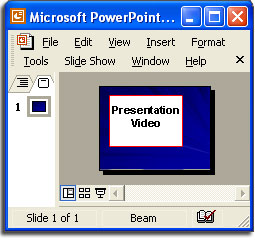
At the right is another useful feature illustration. Anyone who needs to add a Camtasia video to a PowerPoint presentation will immediately discover how easy this is, too. Another plus is Camtasia's ability to output files in many formats: AVI, Macromedia Flash (SWF), Macromedia Flash Video (FLV), Windows Media (WMV), QuickTime (MOV), RealMedia (RM), Executable (EXE), and Animated GIF. Not all formats have the same features. For example, an animated GIF can't have embedded audio. To see how Camtasia works, take a look at TechSmith's movie created with (what else!) Camtasia.
Nerdly NewsAttack of the killer botsMicrosoft says a recently released critical vulnerability patch was buggy and leaves systems open to attack by "bots". The difference between a "bot" (short for "robot") and a worm is academic. A bot will not attack an internal network as a worm will, but the bot can grab e-mail addresses, capture screens, terminate anti-virus software, and modify the local HOSTS file to prevent DNS queries on specific domains. The domains blocked are usually those that provide antivirus utilities. The attack is staged against the "Local Security Authority Subsystem Service" (LSASS) on Windows 2000, Windows XP, and Windows 2003 Server systems. LSASS is interface for managing local security, domain authentication, and Active Directory processes. Symantec says the bot is widespread and active: the company estimates that millions of machines have been compromised. Microsoft issued a patch on April 13 that was designed to correct the LSASS problem, but the patch was buggy. After installing the patch, some users report that their Windows 2000 machines will not boot. According to Microsoft, "After you install the security update that is described in Microsoft Security Bulletin MS04-011 ... your computer [may appear] to stop responding at startup, you [may not be able to] log on to Windows, or your CPU usage for the System process [may approach] 100 percent." If a driver fails to load at startup, the bug causes Microsoft Windows 2000 to continually attempt to load the driver. Because the system resources are all consumed by this process, the system appears to have stopped responding. The bug apparently affects only Windows 2000 machines. Microsoft hasn't announced when they expect to solve the problem. Windows XP SP2: Not until at least JulyMicrosoft says that Windows XP Service Pack 2 has been delayed until the third quarter, and while that could mean as early as July 1, it also could mean as late as the end of September. Still, it's better to get it right than to release it "on time" but filled with flaws. Service Pack 2 will include many new security features and was originally scheduled to be available before mid year. Microsoft let beta testers work with release candidate 1 in the middle of March. A second release candidate will be out by the middle of May. Microsoft won't comment publicly on reasons for the delay, but presumably some security problems remain unresolved. Service Pack 2 will include a true firewall and a new control panel called the Windows Security Center. Floodgates remain open at GatewayJust a month ago, we talked about Gateway's plans to close its retail stores and lay off thousands of workers. The process continues with Gateway announcing that it will eliminate 40% of its remaining positions -- that's about 1500 jobs. The company made the announcement as it posted its 13th loss in 14 quarters. When this round of layoffs is complete, Gateway will be left with 2000 employees, or about 8% of its 25,000 employees in 2000. Gateway is hoping to stay afloat by concentrating on its professional product line, which is sold by "value added resellers". The systems with Gateway's name will use techniques developed by Emachines, the company Gateway recently acquired. Emachines is an efficient development and manufacturing company. Gateway may have acquired Emachines, but the company is moving its headquarters to Orange County, where Emachines is headquartered, the head of Emachines is Gateway's new CEO, and the Emachines management team is running the show even though Gateway founder Ted Waitt is still the company chairman. Let us know what you think about this program! Write to: |
||||||||||||
|
|
Privacy Guarantee:I HATE SPAM and will not sell, rent, loan, auction, trade, or do anything else with your e-mail address. Period.
|
This is the only ad you'll ever see on this site. It's for my website host, BlueHost in Orem, Utah. Over the past several years, they have proven to be honest, reliable, and progressive. If you need to host a website, please click the banner below to see what BlueHost has to offer. As if you didn't already get enough weather on the radio! Annoying legal disclaimer
[an error occurred while processing this directive] |
||

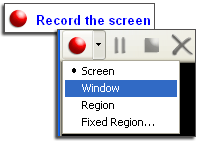 TechSmith makes Camtasia so easy to use that recording a screen sequence is literally as easy as pushing a "record" button.
 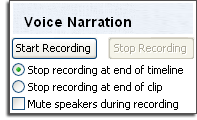 When you're ready to add narration to your captured video, you'll find that this is also easy to do.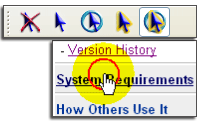
 Camtasia makes it easy for the viewer to follow the cursor. In the sample at the left, the cursor is highlighted in a way that it's impossible to miss.


