
WTVN Radio • Columbus, Ohio • Sunday morning from 8 until 9
Who's in the corner?
Is this information useful? If so, consider
making a contribution, please.

|
|
WTVN Radio • Columbus, Ohio • Sunday morning from 8 until 9 |
|
| Home
• Previous
page Who's in the corner? |
Is this information useful? If so, consider |
|
| |
Sunday, April 11, 2004 |
Random thought:
|
 |
|
Pack your Suitcase and let's go!Suitcase has been an important application on Macs for years. I'd say how many years, but I don't have a clue. It's been a long time, though, because earlier versions of the operating system had severe limitations on how many typefaces could be retained in memory simultaneously. OS X has changed the equation substantially and version 10.3 of the operating system includes, for the first time, Apple's own typeface manager. Does that mean Mac users no longer need Suitcase? That depends. If you're a graphics professional, you still need suitcase. If you're the kind of person who uses the handful of typefaces that came with your Mac, the built-in font manager is adequate. Between those two extremes are a lot of people who might be able to get by with the operating system's font manager, but who also might be better served by Suitcase. Suitcase X1, released late last year, is clearly a far more robust application than what Apple provides. The more typefaces you have, the more important Suitcase becomes. And for creative professions who need to examine the nuances of various typefaces during the selection process, it's indispensable. Even OS X bogs down if the user installs hundreds of typefaces simultaneously. But the person who works on several projects, each of which might require a variety of specific typefaces, installing and removing typefaces can be both a time waster and a source of constant annoyance. Suitcase simplifies the process by automating it. The Suitcase preview pane shows what a typeface looks like without forcing the user to install it. And for those times when a designer wants to compare the appearances of several typefaces, it's easy to view them all on screen. Users can add keywords and styles to categorize typefaces. This is a crucial feature for those who have thousands of typefaces on their machines. Besides using the application's pre-defined styles, users can create their own. Then users who need to find a typeface can search based on the typeface's name, the assigned style, or a key word. All faces used by the Fubar Company could easily be tagged "fubar", for example. Extensis has a licensing agreement with FontDoctor, and this allows Suitcase to scan for corrupt fonts and then to repair the font, if possible. Just as on the Windows platform, duplicate typefaces can be a problem on the Mac. Suitcase allows users to identify duplicate typeface files, to select the file that should be used, and to delete the extraneous copy. With this version of Suitcase, Extensis had added auto-activation support for QuarkXPress. The feature also works for Adobe InDesign and Adobe Illustrator. Suitcase automatically activates any typefaces that are not active but are used in an application file -- including those in embedded in EPS files -- when the file is opened. For additional information on Extensis Suitcase X1, visit the Extensis website.
Suitcase costs $130 for new users, with upgrades priced at $50 for previous users and $60 for users of FontReserve. MenuMaker:
|
||||||||||||||||||||||||||||||||||||||||||||||
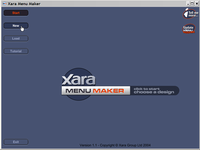 |
Open the application. You won't need my help to do this. |
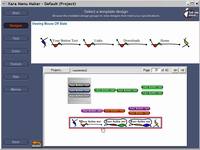 |
This may be the most difficult step: Scroll through the dozens and dozens of samples until you find the one that suits your site. Before you do this, you should also know exactly how you want people to be able to navigate your website. Plan first, then create. |
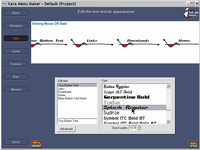 |
If you prefer a different typeface than the one that Xara used, you can easily change it. |
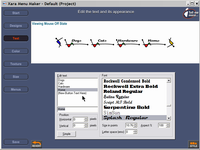 |
Name each of the top-level menu items ("buttons"). |
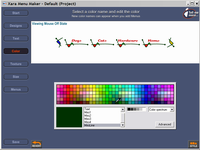 |
If you'd like to change the color scheme, you'll do that here. You have control over the color of text, the background, and (in this case) even the accent colors. The accent colors are used in the sub-menus. |
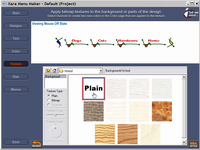 |
Some menus look good with a background texture or image. This one has so many fine details that it looks good only on a solid background. Trust me on this one. If I show you this menu on a textured background, I first have to pass out air-sickness bags. |
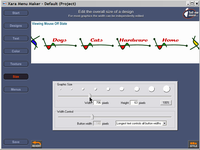 |
I wanted this menu to be a bit larger, and the change took about 3 seconds. |
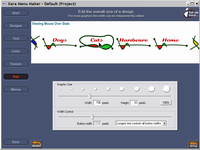 |
Hovering the mouse over the menu, I was able to see how the interactive functions work. |
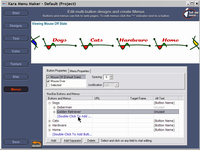 |
The next step involves creating sub-menus. |
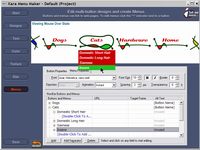 |
Now when I hover the mouse, the sub-menus appear. |
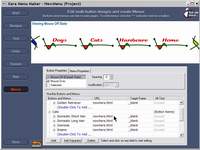 |
All that's left is assigning links to each of the menu items. If you've ever created a Web page, you'll know how this works. |
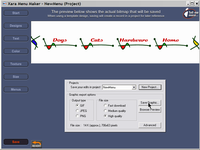 |
I name the project and save it, which also creates the necessary HTML, Javascript, and images. |
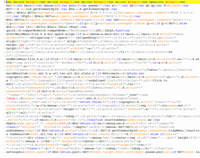 |
The only complaint I have is that the Javascript created by MenuMaker is virtually unreadable. Everything is jammed together without any formatting. This may be intentional to keep people from stealing the code, but those who want to steal the code will, but those who want to learn from it will be inconvenienced. As far as I know, there is no performance advantage to be gained by removing all the whitespace characters from JavaScript. |
 |
The HTML page that the application creates includes a small piece of code (highlighted in yellow) that you can copy into your own HTML. |
Technology corner rating for MENU MAKER 1.1 (Windows) |
|
 |
TEN CATS: There is simply no easier way to create dynamic HTML menus than MenuMaker. The program comes with a wide variety of "starter" menus and then allows the user to make extensive modifications to the appearance. |
| How the Technology Corner rating system works. | |
The upgrade costs $10 for the download version or $15 plus shipping for a new CD. New users will have to pay the full price, but even that is more than reasonable -- just $25, or $30 plus shipping if you want the CD. For more information, see the Xara MenuMaker website.
Companies such as UPS make it easy to send a package, or so they claim. Sometimes reality differs a bit from the website hype. Here's an example of what can happen:
What we have here is an example of "customer service" that isn't. Each of the three people the guy spoke with was polite and sounded as if she cared, but not one of them could offer any real assistance. What I find really astounding is this: Nobody at UPS seems to have the authority to waive a silly $3 pickup fee. Waiving that fee and getting the package picked up that day wouldn't completely erase the guy's dissatisfaction, but it might have convinced him that UPS cares about its customers.
As you've no doubt guessed by now, the "guy" was me.
If a company like UPS is going to have a website and if UPS will let anyone set up a "UPS Store" and use the UPS logo, then one of two things should happen:
Had the UPS website simply noted that The UPS Store at 30 Dillmont Drive has a policy that's contrary to corporate policy, I would have known better than to have gone there. As it was, UPS wasted my time and a clerk's time. Even worse, the apparent unwillingness on the part of UPS to empower its employees to solve problems for customers, has lost the company a customer. Granted, my "lifetime value" to UPS is probably measured in hundreds of dollars, but a company that loses enough such customers will see an effect on its bottom line. All it would have taken to keep 20+ years of goodwill would have been these words: "We'll have a truck at your office later today."
It's quite an accomplishment for the combined acts of a franchise operation (if that's what "The UPS Store" is) and corporate customer service to convert a long-time customer with whom the company had built up a lot of goodwill over the years into a boiling-mad former customer in about an hour.
Technology corner rating for UPS and THE UPS STORE |
|
 |
TWO CATS: At least they were polite. Totally unhelpful, but polite. FedEx or the USPS are better choices. |
| How the Technology Corner rating system works. | |
I received a call from Teresa Austin in the Columbus office. My letter was apparently discussed at UPS headquarters and then forwarded here for response.
Ms Austin told me that they investigated and found (gasp!) that my complaint had merit. The website wording is absolutely clear, but only if you're a UPS employee who knows that "The UPS Store" operations are not "UPS-staffed".
I have been told that the website will be changed (but Ms Austin has no idea how long it will take) because the explanation on the website isn't clear. I have also been promised a full refund.
I found an off-hand remark somewhat enlightening. Apparently Ms Austin has dealt with customers who received impolite responses from the customer service department. She was happy (and somewhat surprised) that this hadn't happened to me.
My primary problem with Norton is the significant resources the application needs -- enough to slow even a fast machine with a lot of RAM (2.4GHz, 1GB) -- so about a year ago, I switched to AVG Antivirus and have been delighted with its performance. I use the paid version at the office and the free version on my notebook.
The second-most-important point, though, is to have an antivirus program (about a dozen are available) and to keep it updated -- I set AVG to check for updates daily.
The most important point is that no antivirus program will catch every bad file thrown at it. Between the time a virus/worm is released and the time you AV program installs the updated definitions file, the provider must identify the threat, develop a strategy to eliminate the threat, prepare and test updates to the AV program, and make them available. This process routinely takes 72 hours or more. If you're one of the early receivers of the infected file, the only thing that will save you is your own intelligence NOT to launch an attachment unless you're absolutely certain that it's safe.
At least weekly visits to the Windows update site is a good idea, too, because Microsoft regularly issues patches for its operating systems and for IE. These are released on a regular schedule, but occasionally a serious problem makes it worthwhile to release an update prior to the next scheduled date.
Mac users need not be quite as vigilant, but cross-platform threats are becoming more common. On the Mac, I use Norton Antivirus because I haven't had time to research any other options. It seems not to create the performance degradation I noticed on the PC, even on a slow Ibook with not much memory (500Mhz G3, 512MB).
THIS SECURITY BUG CAN BITE EVEN IF YOU DON'T USE MSIE AS YOUR DEFAULT BROWSER. That's because the exploit uses the ITS protocol handler, which calls MSIE unless you have specifically changed it. An exploit could allow a attacker to execute code with the privileges of the user.
Solution? Microsoft is working on it, but nothing currently exists. According to the Computer Emergency Response Team (CERT) at Carnegie Mellon University:
There is a cross-domain scripting vulnerability in the way ITS protocol handlers determine the security domain of an HTML component stored in a Compiled HTML Help (CHM) file. The HTML Help system "...uses the underlying components of Microsoft Internet Explorer to display help content. It supports HTML, ActiveX, Java, [and] scripting languages (JScript, and Microsoft Visual Basic Scripting Edition)." CHM files use the InfoTech Storage (ITS) format to store components such as HTML files, graphic files, and ActiveX objects. IE provides several protocol handlers that can access ITS files and individual CHM components: its:, ms-its:, ms-itss:, and mk:@MSITStore:. IE also has the ability to access parts of MIME Encapsulation of Aggregate HTML Documents (MHTML) using the mhtml: protocol handler.
When IE references an inaccessible or non-existent MHTML file using the ITS and mhtml: protocols, the ITS protocol handlers can access a CHM file from an alternate source. IE incorrectly treats the CHM file as if it were in the same domain as the unavailable MHTML file. Using a specially crafted URL, an attacker can cause arbitrary script in a CHM file to be executed in a different domain, violating the cross-domain security model.
Any programs that use the WebBrowser ActiveX control or the IE HTML rendering engine (MSHTML) may be affected by this vulnerability. Internet Explorer, Outlook, and Outlook Express are all examples of such programs. Any programs, including other web browsers, that use the IE protocol handlers (URL monikers) could function as attack vectors. Also, due to the way that IE determines MIME types, HTML and CHM files may not have the expected file name extensions (.htm/.html and .chm respectively).
Because there is currently no security patch available and because this exploit doesn't depend on the user's running MSIE as the default browser, caution is the best defense. Specifically:
Alternatively, you could delete or rename this key in the Registry:
HKEY_LOCAL_MACHINE\SOFTWARE\Classes\PROTOCOLS\Handler\{ms-its,ms-itss,its,mk}
Warning: Editing the Registry can be dangerous. Do not attempt it unless you know what you're doing.
|
|
Privacy Guarantee:I HATE SPAM and will not sell, rent, loan, auction, trade, or do anything else with your e-mail address. Period.
|
This is the only ad you'll ever see on this site. It's for my website host, BlueHost in Orem, Utah. Over the past several years, they have proven to be honest, reliable, and progressive. If you need to host a website, please click the banner below to see what BlueHost has to offer. As if you didn't already get enough weather on the radio! Annoying legal disclaimer
[an error occurred while processing this directive] |
||




