
WTVN Radio • Columbus, Ohio • Sunday morning from 8 until 9
Who's in the corner?
Is this information useful? If so, consider
making a contribution, please.

|
|
WTVN Radio • Columbus, Ohio • Sunday morning from 8 until 9 |
|
| Home
• Previous
page Who's in the corner? |
Is this information useful? If so, consider |
|
| |
Sunday, February 14, 2004 |
Random thought:
|
 |
|
Corel Draw Graphics Suite 12:
|
|||||||||||||||||||
 |
When Draw 12 opens, you'll see what has become a familiar screen of options, but now instead of just the single most recent file, you'll see a list of several recent files. Subtle, yes, but a nice usability feature improvement. |
Click any of the illustrations in the article for a larger view.
Unlike graphics applications from Adobe and Macromedia, Corel Draw has always concentrated on keeping the desktop as clean and clear as possible. Corel's toolbox is "sparse" (that's a term used in the 1980s and it still applies today). Instead of including lots of open toolbars, dockers, and palettes, Draw keeps most of the clutter in the background. The toolbar appears to have only 15 tools, but if you include the multi-purpose icons that hold several tools, you'll find that the toolbar actually contains more than 60 tools. They're just in comfy compartments, that's all.
 One of the most fascinating new features is called Dynamic Guides. In previous versions, I could turn on Snap To Objects so that when I dragged one object close to another, the one I was dragging would snap to the outline of the stationery object. Usually what snapped, though, wasn't what I wanted. It's a feature I rarely used. But after using Dynamic Guides for less than 5 minutes, I believe that this is a feature I will rarely turn off.
Note the blue center-line in the Draw 12 version and also note that the circle has snapped into position.
Grabbing the center point of an object and dragging it causes blue lines and hints to appear as the object approaches another object. I'm told when the center point of what I'm dragging is exactly over a border, an intersection, a node, or a midpoint. Instead of having to drag in a dozen or more ruler lines, I can use the dynamic guides to align objects. If you use Corel Draw for tasks that require careful alignment, this feature alone could be worth the price of the upgrade. And it works with text, too, and it makes aligning text baselines to other objects so easy that I have to wonder why nobody thought of this in any of the previous 11 versions.
 Even the built-in kerning works well. Kerning describes the adjustments made so that letter pairs will appear to fit together better visually. Note in particular how the "T" and the "o" fit together in the sample at the right. When text (and particularly headline text) isn't kerned, it will appear to have too much space between the letters. Corel's built-in kerning is fine for all "body text" and acceptable even for headlines. Because Draw makes the process of kerning individual letters so easy, it's easy to go overboard and kern letters too tightly in headlines. It's better to kern with care.
 A related feature makes it possible to slide any letter up or down, left or right, and to rotate the letter. This is a feature you won't use often, but Draw 12 eliminates the need to convert text to curves, break them apart, and then join the parts of any letters with open spaces before rotating a letter. This is a technique that is used occasionally in trademarks. Occasionally, please! And even then it's probably over-used.
Whether you call this a new feature or not, it could sell some product: Draw now offers output options "to Office" (and that means both WordPerfect Office and Microsoft Office). That could be the key to prosperity for Corel products. Despite the applications' robust set of features, it's foolhardy to think that Corel can wrest the professional graphics market away from Apple and Adobe. Not all graphics professionals use Adobe applications on Apple computers, but most do. Corel may now see its future as leading through office workers: People who must put together PowerPoint presentations and the like.
Previous versions of Draw had "issues" (aka "problems" aka "bugs") in creating output for some other applications. The worst of these was never really acknowledged as a bug. Exporting a Draw graphic as a GIF image for a website always left a visible 1-pixel-wide border around the graphic. Corel's new export engine does away with that and now, instead of having to export images from Draw as TIFFs or PNGs for use by Macromedia Fireworks, I can export images directly as GIFs with transparency.
ERROR! Unfortunately, this bug is NOT fixed. Fortunately Draw guru Rick Altman saw the review on Friday and sent me a note: "Oh, how I wish it were true! Alas, I still see the border, and even the white dot in the corner. If you have eliminated that loathsome bug, I'd love to know what you have done that I don't know how to do...!" Some of the testing I had done incorrectly led me to conclude that this bug was gone. It isn't as you will clearly see if you take a look at my more extensive tests here. This test page is ugly and probably contains its share of spelling errors. I conducted the tests Saturday morning and kept notes to myself on the HTML page I was using for testing. It was never intended for public consumption. |
Even with this bug, I can still create an image, export the image, open it in Fireworks, and export the final image faster using Draw than I could using any other application for the complete process. I hope that someday the developers at Corel will admit that the export engine has a serious flaw that needs to be corrected.
Perhaps the real key to success for Draw 12 lies with Microsoft PowerPoint. PowerPoint is the most used application for presentations. If you haven't seen at least one PowerPoint presentation in the past month, you're probably either retired or visiting from another galaxy. The federally mandated minimum monthly requirement for PowerPoint presentations is 3 per person. But PowerPoint's built in graphics capabilities are none too strong (and I'm being kind). Creating graphics in Draw and using them in PowerPoint is a developer's dream come true.
There's a lot more that I could say about Draw and most of it ranges between good and excellent, but both time and space are limited. Perhaps it's enough to say that if you like the way Draw works and you're using an earlier version, you should upgrade to this version. It's solid right out of the box.
In previous versions, that would be no great accomplishment, particularly those versions with even numbers. They didn't become stable until the first or second service pack. The bug in a carry-over from version 11. It's obscure and unlikely to bite most people. If you create an object from the outline of certain complex objects and then try to fill the resulting object, you may not like what you see.
Let's see a show of hands -- how many people have needed to create an object from the outline of a complex object. Anyone? Although there are probably more bugs in there somewhere, this is the only one I found. It's not a new bug, and it isn't as likely to cause problems as it did in version 11.
 |
VERSION 11 At the left is a complex letter A. On the right, I've converted it to curves, and then convert the outline to an object. The fill is pretty ugly and the object has lots of extra nodes. |
 |
VERSION 12 In version 12, the process works in some cases that would have failed in version 11, but it's still not perfect. The number of nodes has been decreased significantly, but the object breaks into several pieces and the fill fails. |
Most of what you see in the illustration below illustrates features that have been in Draw for quite some time and there wasn't room to illustrate dozens of additional features. I've been told that with designs like this I have a great future in advertising. But I'll have to move to Tijuana. Note the white triangle in the fill on the "Basic Shapes" banner; this is the same bug that I showed you with the letter A.

Be sure to put on dark sunglasses before clicking click the image to see the larger view.
If you're going to part with $180, you might want some reasons for doing so. Here are some:
There you have 9 pretty good reasons for buying the $179 upgrade. That would be just $19.89 per feature, and it's hard to beat that deal.
While Photo-Paint doesn't have a lot of new features, it's still a functional application that can take the place of an application such as Adobe Photoshop, depending on your needs. The latest version of Photoshop has some outstanding features, but it also has an outstanding price tag. Photo-Paint can do virtually everything Photoshop can do (sometimes with a little more work) and many of its features are easier to use than those in Photoshop.
If you're a professional photographer or a professional graphics artist, you'll probably need Photoshop and the hundreds of little control panels that Photoshop has. (OK, it's really not hundreds, but it seems that way sometimes.) Corel's sparse tool set philosophy continues in Photo-Paint.
So before you go out and spend a lot of money on Photoshop, take a look at what's available here.
If you've heard me talk about SnagIt from TechSmith, you know what my favorite screen capture application is and there's no question that SnagIt is faster and easier to use than Corel Capture.
But, as with Photo-Paint, Corel Capture does what it's supposed to do and it's included in the package. If SnagIt didn't exist, I'd be excited about the capabilities built in to Capture. It offers most of the same features.
I've had a great respect for CorelTrace for the past several years. Sometimes someone gives me a monochrome, jaggy logo that I need to use. The bitmap image is horrid, but I've found that I can tinker with the resolution of the image a bit, hand it to Trace, and have Trace give me back a respectable vector graphic that I can use in Draw.
Rave is Corel's application that creates files in the Macromedia Flash file format. What's wonderful about it is that it looks and feels like Draw. Anyone who's familiar with Draw will be able to turn out a Flash presentation in minutes and probably without reading any of the instructions.
The new version produces better output, but the files are still much larger than those created by Flash and the more complex, high-end functions that Flash brings to the party are still missing from Rave. The application is suitable for some small, basic presentations, but people who need to create complex Flash presentations will still have to visit the Macromedia store, at least for now.
The latest version of the typeface manager is a welcome addition to the package. Having more than 500 or so typefaces active on your computer can cause slow operation. Font Navigator allows you to swap faces in and out with ease.
Corel Graphics 12 comes with a manual that's not printed in color and is not printed on glossy paper. Both of these were probably cost-cutting measures, but they don't adversely affect the product. The most important part of any manual is the words and words are easier to read on matte paper. And with few exceptions, adding color to a reference/instruction manual adds little value. Some of the Photo-Paint discussions might be aided by the inclusion of color images, but I don't see this as a serious shortcoming.
If you buy the upgrade, there is no second manual in this version. That means you don't have a reference manual to display the typefaces that are included with the product (Bitstream Font Navigator does a better job that a book, anyway) and you can't see the clip art that's included. Even that is OK because a free application called ROMCat lets users index the CD and then search for key words. If you buy the full version, you will get the second manual with thumbnail images of all the clipart, illustrations, and photos. The typefaces are also illustrated.
Starting with version 11, Corel eliminated the information RomCAT uses to build a catalog. That means you'll have to wait until a new version of the RomCAT database is available. The one created for the version 11 clipart was less than completely useful, so I continue to search the version 10 clipart first. (Sigh.) And it appears that Draw 12 includes some new art. Oh well ....
$399 for the full package and $179 for the upgrade. Compare these prices to any competing product and you'll begin to understand the value that Corel Draw 12 is. You are eligible to buy the upgrade if you own a previous licensed version of Corel Draw, Corel Draw Graphics Suite, Corel Draw Office Edition, Corel Draw Essentials, Corel Draw Select, Corel Draw Classic, Corel Designer, Corel Photo-Paint, Corel Painter, Corel Picture Publisher, Micrografx Designer, Micrografx iGrafx Business, Micrografx Graphics Suite, Adobe Illustrator, Adobe Photoshop, ACD Canvas, Jasc PaintShop Pro, or Macromedia FreeHand. If you own a trial version, and "not for resale" version, or Corel Draw 8 LE for Macintosh, you are not eligible for the upgrade.
Technology corner rating for COREL DRAW GRAPHICS SUITE 12 |
|
 |
TEN CATS: This is as good a product as I've ever seen from Corel and the 10 cats are for Draw only. If I take the other components into consideration, we're talking about some extra kittens here. There is no other graphics application -- on a Windows machine or a Mac -- that makes work so quick and easy, nothing that is as versatile, nothing that offers as much value for the money. (TRUTH IN REVIEWING: No, I do not own stock in Corel. I have taught at CorelWorld, but that is not a corporate event.) |
| How the Technology Corner rating system works. | |
For more information, see the Corel website.
If your computer still uses a browser to display images people send you and you don't want to spend money on a top-of-the-line viewer-organizer-editor-manager such as Thumbs Plus or ACD Systems See ("ACD See"), you have an alternative: IrfanView.
IrfanView is almost free. The writer of the application doesn't want you to send money unless you use IrfanView in a business -- and even then, it's just $10. Originally from Jajce, Bosnia, Irfan Skiljan now lives in Austria. IrfanView can be set to be the default viewer for nearly every kind graphic file, or just a few -- it's your choice. I have set it to be the default viewer for most files because it's a small program that opens in an instant.
If I'm going to be working on a file in Corel Photo-Paint or Adobe Photoshop, I'll open it from that program. Having the double-click default be IrfanView is perfect for me.
I said that it supports a lot of file formats. How many? Count them if you wish: ANI, CUR (Animated Cursor), B3D (BodyPaint 3D format), BMP, DIB (Windows Bitmap), CAM (Casio digital camera format [JPG version only]), CLP (Windows Clipboard), CPT (CorelDraw Photopaint format [CPT version 6 only]), CRW (Canon RAW format), DCM/ACR (Dicom/ACR file format for medical images), DCMultipage (Multipage PCX format), DDS (Direct Draw Surface format), DJVU, IW44 (DjVu format from AT&T, version 2), DXF (Drawing Interchange format), ECW (Enhanced Compressed Wavelet), EMF (Enhanced Metafile Format), EPS (Encapsulated PostScript [TIF preview only]), FPX (FlashPix format), FSH (EA Sports FSH format), G3 (Group 3 Facsimile Apparatus format), GIF (Graphics Interchange Format), ICL, EXE, DLL (Icon Library formats), ICO (Windows Icon), ICS (Image Cytometry Standard format), IFF, LBM (Interchange File Format), IMG (GEM Raster format), JP2, JPC, J2K (JPEG 2000 format), JPG, JPEG (Joint Photographic Experts Group), JPM (JPEG2000/Part6, LuraDocument.jpm), KDC (Kodak digital camera format), LDF (LuraDocument Format), LWF (LuraWave Format), Mac PICT, QTIF (Macintosh PICT format [Quicktime required]), MNG, JNG (Multiple Network Graphics), MrSID, SID (LizardTech's SID Wavelet format), NEF, MRW, ORF, RAF, DCR (Digital camera RAW formats [Nikon, Minolta, Olympus, Fuji, Kodak]), NLM, NOL, NGG (Nokia/LogoManager files), PBM (Portable Bitmap format), PCD (Kodak Photo CD), PCPC (Paintbrush format from ZSoft Corporation), PGM (Portable Greymap format), PNG (Portable Network Graphics), PPM (Portable Pixelmap format), PSD (Adobe PhotoShop format), PSP (Paint Shop Pro format), RAS, SUN (Sun Raster format), RAW (Raw [binary] data), RLE (Utah RLE format), SFF (Structured Fax File), SFW (Seattle Film Works format), SGI, RGB (Silicon Graphics format), SWF (Macromedia Flash format [Version 4 only]), TGA (Truevision Advanced Raster Graphics Adapter [TARGA]), TIF, TIFF (Tagged Image File Format), TTF (True Type Font), TXT (Text [ASCII] File [as image]), WAD (WAD3 Game format), WBMP (WAP Bitmap format), WMF (Windows Metafile Format), XBM (X11 Bitmap), and XPM (X11 Pixmap).
And these video/audio format, too: AIF (Sound file, Audio Interchange Format), AU, SND (Audio format used by Sun and NeXT machines), MED (MED/OctaMED sound format), MID (Musical Instrument Digital Interface [MIDI]), MP3 (MPEG audio layer 3 format), OGG (OGG Vorbis sound format), RA (Real Audio sound format [Real Player required]), WAV (Windows audio file), ASF (Advanced Systems Format), AVI (Audio Video Interleaved), MOV (QuickTime Movie format), MPG, MPEG (Moving Pictures Experts Group format), and WMA, WMV (Windows Media Audio/Video format).
Some of these formats require a plug-in, but most (maybe all) of the plug-ins are free, too.
When it comes to some of the high-end organizing and editing functions that you'll find in other programs, IrfanView is lacking. But if what you're looking for is a most capable viewer, this is exactly what you need. And even then, there are additional features: some limited editing capabilities, format conversion, thumbnail views, and even a slide show option.
Technology corner rating for IRFAN VIEW |
|
 |
SEVEN CATS: Yes, other applications have more features, but IrfanView covers all the basics and covers them incredibly well. The quick viewer is a real prize because it opens instantly to display the image you've selected. This is the perfect application to set as your default viewer. |
| How the Technology Corner rating system works. | |
For more information, see the IrfanView website.
I was sitting there in front of my computer minding my own business when a warning arrived in my e-mail in-box. "Visa-security.com" wanted me to know that my credit card number had been stolen. Problem was, the address "visa-security.com" used was an address unknown to anyone who has issued me a credit card.

In addition to that, I know that Visa doesn't contact cardholders directly. That task is left up to the issuing banks and most of the banks are smart enough not to contact a customer by e-mail when there's a security concern. So who is this "visa-security.com"?
It seems that the account was registered via Tucows (Canada) by someone using a California address, a fake phone number (note the "5555") and a somewhat suspicious e-mail address ("spoof@visa.com"). I know that registrars run automated systems, but you'd think that the registrars would be smart enough to scan recent registrations for certain key words and then flag them for human follow-up.
whois -h whois.opensrs.net visa-security.com ...
Registrant:
Akira Kurabe
800 Metro center blvd
Foster City, CA 94404
US
Domain name: VISA-SECURITY.COM
Administrative Contact:
Kurabe, Akira spoof@visa.com
800 Metro center blvd
Foster City, CA 94404
US
650-444-5555
Technical Contact:
Kurabe, Akira spoof@visa.com
800 Metro center blvd
Foster City, CA 94404
US
650-444-5555
I suspect, too, that Visa Security would have enough smarts to use proper capitalization, but let's see where the link on this page goes. It's hidden (where the escaped address used $ signs, I've substituted $ signs so the link won't work): http://$77$77$77$2E$64$65$6D$6F$73$70$65$6F$70$6C$65$2E$63$6F$6D and that translates to http://www.demospeople.com/.
whois -h whois.crsnic.net demospeople.com ...
Redirecting to TUCOWS INC.
whois -h whois.opensrs.net demospeople.com ...
Registrant:
Chris Johnston
153C Merton Rd
Wimbledon
London, England SW19 1EE
UK
Domain name: DEMOSPEOPLE.COM
Administrative Contact:
Johnston, Chris chris.johnston@casttechnologies.com
153C Merton Rd
Wimbledon
London, England SW19 1EE
UK
44 208 5421333
Technical Contact:
Goldsmith, Lee dns@kthosting.co.uk
260 Picton Road
Wavertree
Liverpool, Mereyside L15 4LP
UK
44 (0)151 421 1511 Fax: 44 (0)151 734 2860
Registration Service Provider:
KT Web Hosting, dns@kthosting.co.uk
44 (0)151 421 1511
44 (0)151 734 2860 (fax)
http://www.kthosting.com
If you require domain name assistance please contact us or see :
www.ktdomains.co.uk.
Should you visit the site (I did) you'll find that it's been shut down. No surprise there. I just wonder how it got set up in the first place.

|
|
Privacy Guarantee:I HATE SPAM and will not sell, rent, loan, auction, trade, or do anything else with your e-mail address. Period.
|
This is the only ad you'll ever see on this site. It's for my website host, BlueHost in Orem, Utah. Over the past several years, they have proven to be honest, reliable, and progressive. If you need to host a website, please click the banner below to see what BlueHost has to offer. As if you didn't already get enough weather on the radio! Annoying legal disclaimer
[an error occurred while processing this directive] |
||
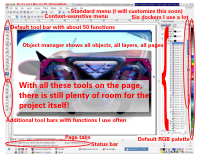 Most of the tools for "professionals" seem to come with an array of controls that choke the screen. CorelDraw's designers have always tried to provide all the necessary tools (and then some!) but they've done it in a way that leaves a large piece of the screen available for what you're working on. Being able to actually see what it is you're trying to work on seems to be quite helpful and I'm not sure why some of the other software companies haven't yet borrowed some of these ideas.


