
WTVN Radio • Columbus, Ohio • Sunday morning from 8 until 9
Who's in the corner?
Is this information useful? If so, consider
making a contribution, please.

|
|
WTVN Radio • Columbus, Ohio • Sunday morning from 8 until 9 |
|
| Home
• Previous
page Who's in the corner? |
Is this information useful? If so, consider |
|
| |
Sunday, February 22, 2004 |
Random thought:
|
 |
|
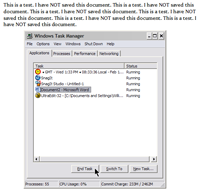
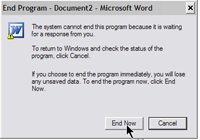
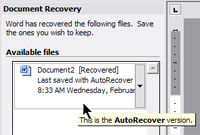
Redecorating your (Microsoft) OfficeDespite challenges from Corel's WordPerfect Office and Sun's Star Office and the (free) OpenOffice open source office suite, Microsoft retains firmly in charge of this market sector. While it's the most expensive option, the end-user license agreement (EULA) has a certain amount of flexibility. An office copy, for example, may also be installed on either a home computer or a notebook computer. Additionally, Microsoft offers a home and student version of the software for $150 and allows it to be installed on up to three computers in the same house. The effective cost "per seat" for that version is $50. To buy this special version, you need to jump through a few hoops, but they're reasonable and they're probably what you would expect. I discussed this version of Office with product manager Simon Marks. An edited version of the interview will be broadcast, but nearly the entire discussion is here ... Collaborate?"Collaboration" is the key term Microsoft uses in promoting Office 2003 and that's an important consideration for users who are part of a team that shares documents. For many of us, though, that's not a particularly important feature. If that's not a big deal, what is? I've been taking a look at the Office applications and have my own list of top new features: Safety belts, airbags, and a padded dash: Have you ever spent all day working on a document only to have it vanish when the power fails, the application crashes, or the computer locks up? You know that you should save early and often, but you don't. I have a habit from the days of DOS that saves me from this problem most of the time. At the end of a paragraph, I have to press Enter to start a new paragraph. In addition to pressing Enter, I also press Ctrl-S, which saves the file. The worst that can happen, unless the disk drive fails, is that I might lose one paragraph. But what if I'm writing a letter that I don't plan to keep a copy of? If I'm not planning to save it, Ctrl-S will do me no good. I haven't given it a name. The easy solution is to call the file "Temp" and replace "Temp" with the next letter that I don't plan to keep a copy of. Still, wouldn't it be nice to be able to work for extended periods on a document and not have to save it all the time? Word's auto-recover feature makes this possible. This isn't a new feature, but it seems to be much more robust than in previous versions.
Using the right side of the screen
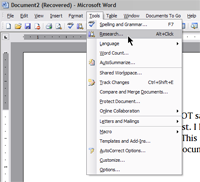
"Research" is an example. Select a word and Alt-click it or choose "Research" from the Tools menu. You'll immediately get a thesaurus entry for the word.
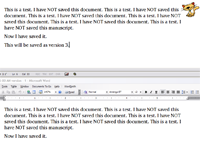
No, wait! I liked it better before I edited it!Editing your work is tricky. Let's say you've written a 5-page report citing various date and time inconsistencies in Robinson Crusoe. After spending 2 hours reorganizing the paper, you decide that you've made a mess of it and the original version was better. Now what?
The other stuffWord isn't the only application in the Office suite, although it gets most of the attention. There's also Outlook, Excel, and (depending on which collection you purchase) Access, FrontPage, PowerPoint, and Publisher. OutlookDespite my continued carping about Outlook as an e-mail client, I make good use of Outlook's other functions. As an e-mail client, Outlook encourages bad habits such as "top-posting" of replies (backwards this makes the message read) and HTML coding. But it's also the most-used e-mail application (which makes it the largest target for the bad guys.) Still, Outlook has continued to improve over the years. I still don't use it because The Bat offers the features I desire in an e-mail application, but I don't threaten to throw people out windows (or Windows) if they insist on using Outlook. And during the review period, I used Outlook occasionally and was pleasantly surprised by a variety of new features and refinements. For a lot of people, Outlook will be an easy choice. As an organizer and calendar, Outlook is the most versatile application to use with my Palm-powered Sprint Treo 600 -- particularly when it's coupled with Key Contacts from Chapura. ExcelExcel continues to be the spreadsheet that's used by "number people". I'm not exactly a number person, so I'm not able to give Excel its due.
Excel is a wonderful application, by the way, to prepare data for use in a website table, by the way, and it's also almost always a temporary stop for data that's on its way to a database application. I can clean up data in Excel much faster than in Access. Microsoft PublisherCan Microsoft publish? If you've heard me talk about publishing software, you know my opinion that there is only one application that is a full publishing management application right out of the box: Corel Ventura Publisher, the application that Osborne-McGraw/Hill uses to create hundreds of books per year at a pace far faster than would be possible with any other application. Second-place and third-place honors go to Adobe InDesign (I'm still waiting to see the current version) and Quark XPress. Further down the food chain is Adobe PageMaker and Microsoft Publisher. What might I expect from the application that I just put at the bottom of my list? Surprises. MS Publisher is an application designed for people who understand Word but who want to do the kinds of things that are impossible, or difficult, with Word. I'm not planning to trade in 20 years of Ventura experience on Publisher, but the office worker who is -- without any training in graphic design -- ordered to create a flier or brochure may find Publisher to be exactly the right application. The program includes hundreds and hundreds of templates from 50 or more themes. The designs won't win any awards from professional graphic design organizations, but they will save the person who uses them from committing any huge blunders. Sometimes all that's needed is a "workable" design, not a thing of beauty. Publisher starts the user with an acceptable design for business cards, envelopes, calendars, fax cover sheets, and the like. The user can modify these a little (without removing Publisher's handcuffs) or a lot (by using advanced featured.) The cautious user will leave the handcuffs on and will produce a document that isn't ugly. (Stay away from the clip-art.) Front PageFrontPage, like Publisher, would be a good choice for the office worker suddenly tasked with creating website pages. My preference for this kind of work has been Macromedia Dreamweaver, but Dreamweaver is a challenge to master and it's expensive -- particularly for the casual user. FrontPage works "like Word", so it's easy to learn the basics. The primary objection to FrontPage has been that it creates non-standard, bloated code. Those objections no longer really apply. FrontPage's code generally complies with W3C standards and, while a little larger than code created by Dreamweaver, code created by FrontPage could no longer be truthfully called "bloated". That leaves PowerPoint and Access, both specialized tools. PowerPointPowerPoint is the much-parodied presentation software. But PowerPoint is criticized for the sins of its users. As a presentation program, it's hard to beat because it makes most tasks easy and difficult tasks possible. As I learned at last year's PowerPoint Live event, PowerPoint has few limitations on what a user can do with it. AccessAccess is the relational database management tool that can be trained to do nearly any task that involves data. If you need to create a complete inventory management and billing system, Access will do it. Inexperienced users will use the interactive design tools to create tables of data and forms for data entry and output. For many, this will be adequate. Those who need more advanced functions will need to learn how to deal with control properties and may then advance to writing their own scripts to control how Access works. If you're looking for an application to keep track of your Christmas card list, though, consider Excel. Access can handle simple lists like this, of course, but it would be like driving the family Lamborghini to the grocery store. Overall ... If cost is the only factor you're considering, just download the free version of OpenOffice. But if you want applications that work together predictably and that offer cutting-edge features, your only choice is Microsoft Office2003. Updates and more
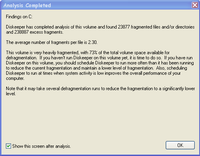
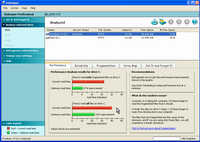
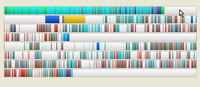
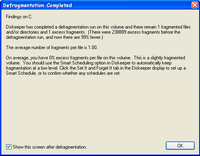
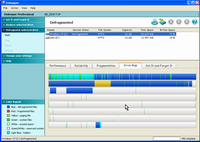
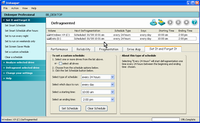
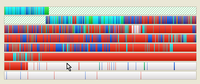
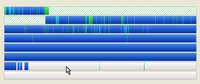
Keep your diskRemember when defragmenting your disk drive was important? Some people ran a defragmenter as part of the DOS start-up process every morning. That may have been because it took half an hour to run on those old, slow 10MB hard drives and it wasn't possible to work while the defragmenter was running. Well, guess what! It's even more important to defragment your disk drive today than it was then. Your disk drive is several THOUSAND times larger than it was back then and a heavily fragmented drive is not a happy drive. Drives are so fast these days that you might not notice the performance hit fragmentation causes unless you edit audio or video files. Still, it's a good idea to defragment the drive and it's something that should be done every day. You have a couple of options. There's the Windows defragmenter. Start it on a 100GB drive and go out for breakfast. If it's still running when you get back, go out for lunch. The better wayInstall DiskKeeper by Executive Software and you'll get a defragmented disk without having to stop what you're doing and wait. Click any of the images below for a larger view.
For more information, see www.execsoft.com. The "home" version sells for $30 and the professional version for $50. If you run Windows XP Pro, you need the professional version because the home version isn't compatible with XP Pro. Nerdly NewsMistake, intentional, or fake?A Mac-centric website in Sweden (www.99mac.se) has published a copy of a memo that it claims was distributed internally at Apple. In the memo, Steve Jobs notes that Apple is profitable and "debt free". That's the kind of memo some companies might let "slip out of the building 'accidentally'" for one reason or another. Or it might have been unintentional. Or it might be a fake.
The sky is falling! The sky is falling!Unless you've been haning out with Osama bin Laden, you probably know that some of Microsoft's operating system source code has been stolen and is being distributed on the Internet. Microsoft is annoyed and has every right to be. The first bit of hostile code is already circulating. You'll excuse me if I stifle a yawn. Open-source software (Linux, for example) is widely available. This leads to certain security "issues", but it also means that a lot of eyes are always looking for problems and solutions. Leaking the source code may create some short-term problems. In the long term, it might be good for Microsoft. And if you think that only Microsoft software has problems ... Some recently announced flaws in the Linux operating system can make un-patched servers vulnerable to attack. A Polish security firm, ISec, announced the flaws earlier this week and The Linux Kernel Project released a new version of the 2.4 series kernel (2.4.25, if you're interested) to take care of the problem. ISec found other security problems earlier this year, too, and it's only February. Linux is probably the most commonly used server software on the Internet, so these security holes have an immediate effect on a lot of people, but to expoit these weaknesses the cracker must have access to the computer -- to be in the same room with the server. Let us know what you think about this program! Write to: |
||||||||||||||||||||||||||||||||||||||||
|
|
Privacy Guarantee:I HATE SPAM and will not sell, rent, loan, auction, trade, or do anything else with your e-mail address. Period.
|
This is the only ad you'll ever see on this site. It's for my website host, BlueHost in Orem, Utah. Over the past several years, they have proven to be honest, reliable, and progressive. If you need to host a website, please click the banner below to see what BlueHost has to offer. As if you didn't already get enough weather on the radio! Annoying legal disclaimer
[an error occurred while processing this directive] |
||

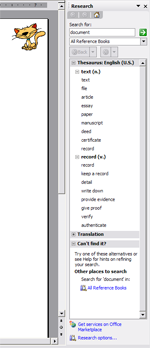
 Microsoft spends a lot of time and money to analyze how people use software. The designers realized that the right side of the screen is a good place to put "extras" that might appear to be in the way on the left side of the screen.
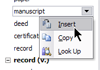 Then you can choose a more appropriate word and insert it -- or translate it if you have installed the appropriate translation dictionary -- or even send the document over the Internet for translation.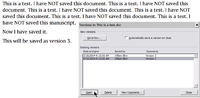
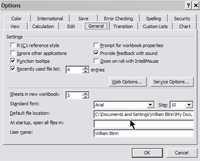 One oddity that remains in this version is in the General tab of the Options dialog. I invariably change the default location for files and most (all?) other Microsoft applications include a "browse" dialog so that I can just point to the directory I want to use. Excel has always required that I type the location. Instead of pointing, I type "C:\data\Excel Data\". While that's not a major shortcoming and I need to do it only once, it's still surprising that this anomaly has survived through so many iterations.
 With this version of Office, Microsoft has established a special area on the website. This special area (

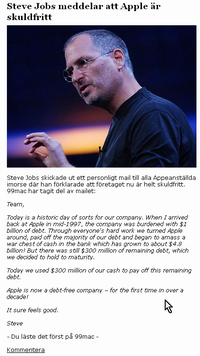 I can't read much of the website (it is in Swedish, after all) but the purported memo is in English. (Click for a larger view.) It says:


