WTVN Radio • Columbus, Ohio • Sunday morning from 8 until 9
Who's in the corner?
Is this information useful? If so, consider
making a contribution, please.

|
|
WTVN Radio • Columbus, Ohio • Sunday morning from 8 until 9 |
|
| Home
• Previous
page Who's in the corner? |
Is this information useful? If so, consider |
|
| |
Sunday, January 25, 2004 |
Random thought:
|
 |
|
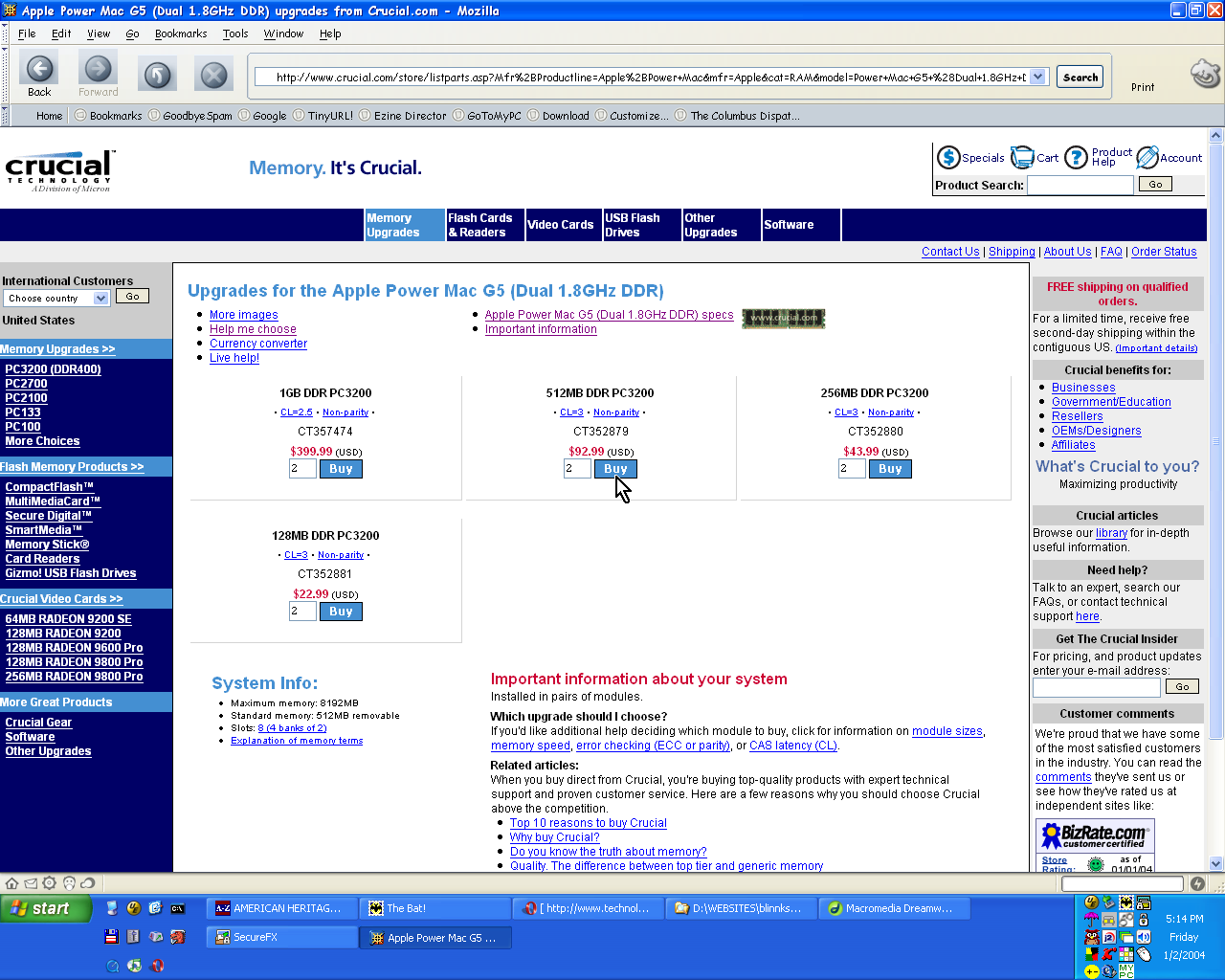
Memory is CrucialShortly before the end of the year, the disk drive in a computer at the office failed. The computer in question was a relatively slow 700MHz machine and even replacing the disk drive would have left me with a slow machine. Fortunately, I'd just taken a substantially faster machine out of service. A 1.7GHz machine was sitting on the floor waiting for an assignment. It didn't have much memory (just 256MB), but I put it on my desk and started installing software. All went well until I actually had to use the machine. I usually have a lot of applications open: It's not uncommon for the American Heritage Dictionary, The Bat, AVG Antivirus, Zone Alarm, AdSubtract, Extensis Suitcase, J2 Fax Manager, SpamPal, WetSock, Site/C, AutoReply, GoToMyPC, Opera, Netscape, Internet Explorer, SecureFX, SecureCRT, Dreamweaver, Fireworks, and CorelDraw to be running simultaneously. Sometimes UltraEdit, HomeSite, Ventura Publisher, Word, HTML Validator, Top Style, and Outlook may be added to the mix. And a variety of utilities and small applications. There will probably also be at least two or three connections to network hard drives. In other words, there's a lot going on. Because the machine runs with a heavy load, I wasn't too surprised that it ran slowly with just 256MB of RAM. Fortunately, the old machine used the same kind of memory as the new machine, so I pulled out a 256MB DIMM out of the dead unit and put it into the live computer. For reasons known only to memory manufacturers, the second DIMM wasn't recognized. So I ordered a 512MB DIMM from Crucial (a division of Micron). When the box arrived a few days later, I didn't bother to read the instructions because I know how to insert a DIMM. I know enough to turn the computer off but to leave it plugged in, to make sure that I've grounded myself to bare metal on the machine before removing the DIMM from its protective bag, and how to insert the DIMM properly. It's a 5-minute job. If all else fails ...The only problem was that when I turned the machine back on, it still saw just 256MB of RAM. So I read the directions. I hadn't bought memory from Crucial before, so this was my first experience with their directions. The small pamphlet was written in 8 languages and fortunately one of them was English. Glancing through the introduction, I saw that I had done everything exactly right, so I took a look at the "troubleshooting" section. And there as step 3 of the troubleshooting tips was something that I vaguely remembered, but hadn't thought about: "Fill your slots starting with the largest density (put the largest module in bank 0, and the second largest in slot 1, and so on). If this doesn't work, try reversing the procedure. Bank 0 had the original 256MB DIMM. Bank 1 had the 256MB DIMM from the dead computer. Bank 2 had the new 512MB DIMM. When I swapped the DIMMs in banks 0 and 2, the computer recognized the full 1GB of RAM! The instructions are surprisingly well written. I noticed a misplaced "only" or two and the punctuation was a little funky, but the information was written by a native speaker of English (increasingly uncommon in the high tech field). In addition, the instructions included a toll-free phone number, two e-mail addresses, and the URL for Crucial's website. Some routine computer maintenance is increasingly something that the average user need not fear. Adding memory is one of those tasks. Memory slots are easy to identify and they're keyed so that it's not possible to install the memory backwards and often so that it's not possible to install the wrong memory. At least not without excessive force, which is one of the reasons that Crucial's instructions say that no tools of any type should be used to remove or install memory. Even picking the right memory is easy. On Crucial's site, you choose the manufacturer and model; the site then selects exactly the right memory modules for you. If you're not willing to trust yourself to get the right information, you can deal with the company by phone, e-mail, or fax. In other words, if you can change a light bulb in a ceiling fixture, you're probably capable of adding memory to your computer. Actually, the hardest part of the process is getting the cover off the computer. If you have a computer that's running any version of XP and you have just 128MB of RAM, your computer needs more memory unless you really enjoy watching the hourglass symbol. I spoke with Crucial's Mike Sanor about the need for more memory that most computers come with ... REAL AUDIO: Mike Sanor (3:38) q-pack of gum Easy does itCrucial's website makes selecting the right memory modules easy. Apple recently released a dual-processor version of the 1.8GHz G5 Power Mac, so I thought I'd test the site by looking for memory that would work with this computer.
This page is an excellent illustration of why it's important to consider your options. Apple ships the G5 1.8GHz dual processor systems with a paltry 256MB of RAM -- two 128MB memory modules. Because the G5 is a dual processor machine, memory must be added in groups of 2. The Crucial site knows this and automatically recommends 2 modules for each of the size options. The choices comprise these size options: 1024MB, 512MB, 256MB, and 128MB. Whichever size you choose, you'll get double the choice because of the G5 dual processor's requirement that you install memory in sets of 2. What's the most economical choice? It's not the 1GB chips at $400 each. If you have slots available, you can obtain 1GB of memory by purchasing 2 512MB modules ($100 each). If you have the slots available, you could pay $400 for 4 512MB modules instead of $800 for 2 1GB modules. If I owned a 1.8GHz dual-processor G5 Mac, my choice would clearly be to add 2 or 4 512MB modules instead of 2 1GB modules. The Crucial website gives you the information you need to make an intelligent choice.
For more information, see the Crucial website. Why is Microsoft nervous about Linux?Microsoft makes no secret that it is concerned about Linux. Microsoft "owns" the desktop today, but that could change in an instant. Remember when IBM "owned" computing? Then an upstart company called Microsoft changed everything. It could happen again, but in reverse. I received an e-mail this week from Michael Conners of Hilliard that mentioned IBM's promotion of Linux. An irony exists in IBM (the premiere provider of proprietary operating systems) promoting open-source Linux, but that's what IBM is doing and Conners says that he is using both Linux and Windows.
And that is exactly why Microsoft is worried about the future. In replying to Michael, I explained that I'm currently not likely to switch to Linux, but that Linux would serve the needs of most computer users. It wouldn't work for me because of what I do:
And so it goes. I know that I could run some of my favorite applications under wine, but I'm not a fan of emulators. Invariably they're slower and buggier than what they want to replace. So I'm still "stuck" with Windows (I have to admit that I like XP) or Mac (OS X makes Unix almost friendly). But for people who want to use office publications (Open Office or Crossover Office, which I haven't seen), browse the Web (Mozilla), and use e-mail (Mozilla or some other application), Linux more than does the job. I currently have no machines running Linux, but the Technology Corner website runs on Linux (it's just not "my" server). Microsoft has very good reasons to be nervous. There's a lot going on in the Linux community -- a lot of smart people working on applications. It's only a matter of time until it becomes a lot more mainstream. My only concern about Michael's recommendation is that of buying "Wal-Mart hardware". I caution people about Wal-Mart machines because I have a feeling that some of the parts will be somewhat substandard. I'd prefer to spend double that (or more -- probably more) and get a company like TCR to build a machine for me. (I have no financial interest in TCR; I just like the way they do business.) Backup! Backup!I received an excellent question this week about backing up critical data. With any amount of luck, I provided an excellent answer, too. I use the email program Eudora and it is important that I save my email in my out box. I would like to have it on something else, just in case I have some type of crash, etc. The important thing with backup is that the backup not be stored in the same building as the computer. The logic is obvious, but easy to overlook: Anything that destroys the computer might destroy other things in the building. Backing up critical files to another directory on the same disk means that a simple disk failure will take the data and the backup with it. Backing up critical files to a second hard disk in the same computer reduces the risk a bit, but a controller failure can still take both drives when it goes. Other risks include theft, fire, tornado, and annoyed cat. If you have a CD burner and you don't have more than 700MB of data, burning the critical data to a CD works well. For more than that (up to 4.5GB) a DVD burner will work. But the best solution I've found is an external hard drive with a Firewire or USB 2.0 interface. I bring the hard disk home from the office once per week and perform either a full backup (about 60GB, once per month) or a differential backup (from 5 to 15GB). The next day, I return the drive to the office, which is about 15 miles from home. My rationale is that something could destroy both the home and the office simultaneously, but I'll have other more pressing problems if that happens. Nerdly NewsBeware the bagel or the beagleThe current threat is known by one of these aliases: WORM_BAGLE.A, I-Worm.Bagle, W32.Beagle.A@mm, Win32.Bbgle.A@mm. It's an Internet worm that arrives as an executable attachment with a random name. The attachment will be about 15KB. The e-mail may appear to come from someone you know. There a good chance that the "genius" who wrote this one let it get away before he had finished working on it because the message consists of this: Test =) Anyone who would open an attachment to a message like that perhaps deserves to be burned. If you do run the attachment, several things will occur: 1) Bagel checks the date and attempts to delete itself if the date is later than January 28, 2004. This is an effort to limit the spread of the worm. 2) If the Registry key HKCU\Software\Windows98 exists, a random 9-digit number will be stored for later use. 3) The worm prevents multiple copies of itself from running by creating an unnamed mutual exclusion. It then places "bbeagle.exe" in the %SYSTEM% directory and creates a Registry key value named "d3dupdate.exe" under HKLM\Software\Microsoft\Windows\CurrentVersion\Run. This ensures that the worm will run every time the user logs on. 4) Registry value HKCU\Software\Windows98\Ffrun will be set to "true". 5) The worm will spawn a copy of "calc.exe" when it runs. Presumably this makes it seem less suspicious when a user examines the task list. And then the fun begins. 6) Beagle/bagel starts a process that is linked to port 6777 and the worm posts information to one of nearly 3 dozen websites. This allows the author to know that your machine is available for his use. 6a) Oh, and by the way, the worm will search every address book, text, and HTML file that it can find on your computer to locate e-mail addresses for additional victims. 7) The back door to your computer is now wide open to accept commands. The author can connect to your computer and upload binary executables. It is unlikely that the author will do something good to your computer. Standard warning: Never, ever run an attachment that you're not expecting -- even if it comes from someone you know. If you believe that you have run an infected attachment, be sure that you have the most current definition file for your antivirus program and have it remove the infection. Spam, spam, spamThanks to the CAN-SPAM act, I now receive about 150 spams in any 12-hour period. Prior to the CAN-SPAM act, I received about 150 spams in any 12-hour period. You can see what an improvement this is! See 12 hours worth of crud (subject lines only). Let us know what you think about this program! Write to: |
||||||
|
|
Privacy Guarantee:I HATE SPAM and will not sell, rent, loan, auction, trade, or do anything else with your e-mail address. Period.
|
This is the only ad you'll ever see on this site. It's for my website host, BlueHost in Orem, Utah. Over the past several years, they have proven to be honest, reliable, and progressive. If you need to host a website, please click the banner below to see what BlueHost has to offer. As if you didn't already get enough weather on the radio! Annoying legal disclaimer
[an error occurred while processing this directive] |
||