WTVN Radio • Columbus, Ohio • Sunday morning from 8 until 9
Who's in the corner?
Is this information useful? If so, consider
making a contribution, please.

|
|
WTVN Radio • Columbus, Ohio • Sunday morning from 8 until 9 |
|
| Home
• Previous
page Who's in the corner? |
Is this information useful? If so, consider |
|
| |
Sunday, October 12, 2003 |
Random thought:
|
 |
|
Like a Bat out of Moldova!I'm a fan of the e-main program The Bat and I've talked about it previoiusly. On September 1, RIT Labs announced version 2 of The Bat, a long-awaited upgrade from version 1. Version 2 has been in development for at least 2 years -- maybe 3 -- and some of the beta testers say the release is premature. I'm happy with it. What I can tell you so far is this: Version 2.0 looks and feels a lot like the version 1.6 (various letter designations) that I've been using for the past year. I can see some new features and some improvements, but overall (Thanks, guys!) the program hasn't been upgraded beyond all recognition. This is good. So far, documentation is still a sore spot. The Bat is astonishingly powerful and almost infinitely customizable. The problem is that the documentation doesn't reveal the application's strengths and Microsoft has slammed Outlook Express onto every Windows computer, so that's what a lot of people use even though the Toronto Star once referred to the application as "LookOut". An acquaintance recently tried The Bat and was sufficiently perplexed that she wrote to me with several questions about why I would recommend such an application. "That blinding, blinking banner with the lime green and white-on-black tiny text that can't be read. I moved it up to the top, but couldn't figure out how to turn it off." Preferences, General, Display mail ticker (hide). Because the ticker can respond to as little as a single directory within an individual mailbox, I've recently enabled it again to make sure that I don't miss a message from a "high-touch" client. I made the text readable by changing the font, too. I strongly recommend that anyone who is trying The Bat should Subscribe to The Bat User Discussion List at http://www.silverstones.com/thebat/TBUDLInfo.html where all questions can be answered. (I've been using this program for more than 3 years and every week or two I discover something new that it does.) Help is only marginally helpful. What's there is fine, but much of the program is not documented. "The automatic opening of messages and not being able to close them--especially not being able to delete a message unread. I had some spam and at least one message that looked like a virus, with a 100 KB attachment. (Probably wasn't, since Norton didn't squawk. But ...) I notice that if you select a message, it opens. I prefer to work from a list." You may be a candidate for the mail dispatcher feature. Or you might want to change the page layout and then turn off "Auto View". It's in the View menu. I love the preview panel and it's not the security disaster tha Outlook's preview panel was. I rarely open messages because I can read them in the preview pane (which is safe for a number of reasons -- one of which is that it won't display graphics that are referenced on a remote server, but only if they're actually in the message. "I'm also fairly sure I gave it a 20 KB attachment limit at set up, but I never could find those settings again." That's for downloads from the server. "That message is the reason I uninstalled--it's the only way I could figure out to delete it without opening it." Opening a message does not open an attachment. The attachment shows up in a sub-panel of the preview window. YOU decide whether to save or open it -- or to delete the message without looking at it. The setting you're looking for will be in the account settings. Choose the account name (marked by @ in the accounts window), right click, and choose Properties. "Related, I couldn't rememember how often I told it to check mail during set up and couldn't find the setting, to check or change." Same place. "Also related, I couldn't change the top-bottom frame layout to the side-by-side (with the folder list on the left, if you please) one I prefer." View, Split Mode (choose the one you like). "Also related, I couldn't turn off the HTML, and it insisted that I needed the V-cards, etc. And I couldn't figure out if I would send plain text, so I didn't send any messages from it." It will read HTML (no need to turn it off; it's safe. If you receive an HTML message, there will be tabs at the bottom of the display. One tab shows HTML. One shows plain text. It sends ONLY plain text. "Not being able to access the individual messages outside the program with a text editor. You can open Eudora mail folders with a text editor. This means if you're in a hurry to back up your e-mail, you can just copy or move the folders. You don't even need to copy the TOCs, although I usually do." I've never wanted or needed to do this. I back up directories of the individual accounts, which gets the e-mail, settings, quick text, address book, etc. The TBB is a binary, but you can open it in a program like UltraEdit and read the messages. If you want to get ambitious, you can export the messages in Unix format. "Not being able to edit incoming messages." Try Ctrl-E. This actually opens the message in "redirect" mode, but you can make any changes you want and then save it to any folder. "What on earth is 'parking' in this context?" Makes the message stick so that you can't delete it. I use this feature a lot. "Any advice or handy URLs you could pass along would be greatly appreciated. I would like to give it a real try." You sound a lot like I did several years ago. This is a program that you can train to do anything. TBUDL is a huge help because the answer to most questions is, "Yes, you can do that, and here's how ...." But the program doesn't give up its secrets willingly. On TBUDL, a new user was complaining about the lack of documentation. I guess it all comes down to a willingness on the user's part, after recognizing the power of the software and the limitations of the documentation, to decide if it's worth the WORK (and yes, it is work) to learn how the application functions. For me, the answer was easy. TB is so powerful, so adaptable, so configurable, and so full of features that I can't live without that I'm willing to spend the time needed to learn how it works. I've been using TB since early version 1 and it takes no more than a glance at other products' feature sets to convince me that they might be prettier or better documented, but they will also be disappointing. Documentation has always been the weakest part of the application; I, too, hope that changes. If it doesn't, TBUDL does a fine job. In the final analysis, I'd prefer that RIT Labs spend limited resources on continuing to develop the best MUA on the planet even if that means documentation doesn't get done.
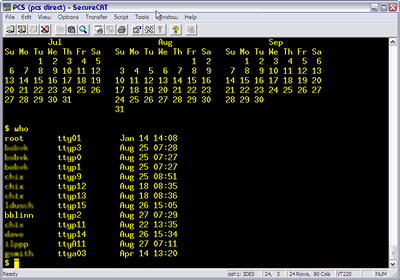
How the Technology Corner rating system works. Unix - how stable is it?People who use Unix or Linux tend to hold Windows machines in low regard. That's because early versions of Windows could generally be counted on to crash daily, if not more often, and careful users typicall rebooted the machine from time to time just to make sure that memory leaks wouldn't affect performance.
Nerdly NewsA report from Symantec, and it's not prettySymantec recently released its latest Internet Security Threat Report, a comprehensive analyses of trends in cyber security. This report includes analysis of data from Symantec Managed Security Services customers as well as more than 20,000 DeepSight Threat Management System registered sensors worldwide monitoring attack activity in more than 180 countries. The report covers network-based attacks, a review of vulnerabilities discovered and exploited, and highlights of malicious code trends. Symantec reports that the increasing prevalence of blended threats, which use a combination of malicious code and vulnerabilities to launch a cyber attack, remains one of the most significant security issues companies face this year. Blended threats accounted for 60% of malicious code submissions in the first half of 2003, and the number of blended threats increased by 20%. Blended threats continue to be the most frequently reported threat. The speed of propagation of blended threats is also increasing. For example, the Slammer worm impacted systems worldwide in less than a few hours. The recent Blaster worm was infecting as many as 2,500 computers per hour. Symantec expects to see greater worm propagation resulting in overloads to network hardware, crippling network traffic, and preventing both individuals and businesses from using the Internet. With the release of the current report, Symantec provides analysis of attacker vulnerability preferences for the first time. This new analysis shows that 64% of all new attacks targeted vulnerabilities less than one year old. Additionally, 66% of all attacks documented in the first half of 2003 utilized vulnerabilities categorized as highly severe. Recent activities support Symantec's analysis that the time from discovery to outbreak continues to shorten significantly. The W32.Blaster blended threat occurred only 26 days after the vulnerability was announced. "The Symantec Internet Security Threat Report combines data from the most comprehensive sources of Internet threat information in the world with exceptional analysis from skilled security experts," said Rob Clyde, Symantec's Chief Technology Officer. "As a result, it provides enterprises a reliable, accurate source of up-to-date Internet security trend data required to strengthen their overall corporate security postures." The report noted several attack trends ...
Don't be a victimSymantec encourages users and administrators to adhere to the following best security practices to better protect their information assets:
Attack trends in the report are based on analyses from Symantec DeepSight Threat Management System and Symantec Managed Security Services. Symantec DeepSight Threat Management System analyzes continuously collected attack data from more than 20,000 registered sensors in more than 180 countries around the world. Vulnerability trends are based on statistical analysis of data housed in the Symantec Security Response vulnerability database, which contains information on more than 8,000 distinct vulnerabilities. Malicious code trends are based on empirical data and expert analysis drawn from Symantec's comprehensive infection and malicious code databases. You may download Symantec's full Internet Security Threat Report from the Symantec website. Let us know what you think about this program! Write to: |
||||||
|
|
Privacy Guarantee:I HATE SPAM and will not sell, rent, loan, auction, trade, or do anything else with your e-mail address. Period.
|
This is the only ad you'll ever see on this site. It's for my website host, BlueHost in Orem, Utah. Over the past several years, they have proven to be honest, reliable, and progressive. If you need to host a website, please click the banner below to see what BlueHost has to offer. As if you didn't already get enough weather on the radio! Annoying legal disclaimer
[an error occurred while processing this directive] |
||